
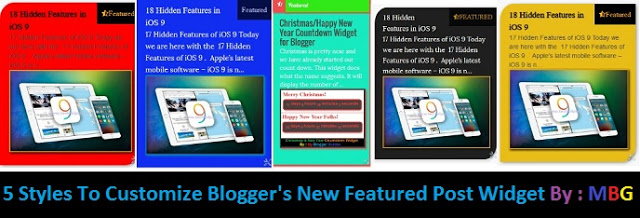
5 Ways To Customize Blogger’s New Featured Post Widget!
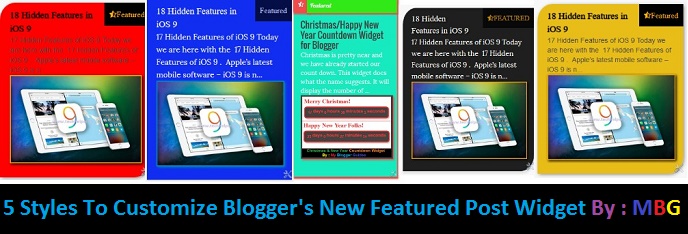
But don’t worry guys Today I’m here with 5 styles by using which you can customize this gadget and show a attractive featured post widget on your blogger blog. If you are newbie then we think you don’t know what is Featured post? So first you should know about featured post.
What Is Featured Post?
“Featured Post makes you able to show off the summary of a particular post with its image (featured image) and its title.” It’s a quite interesting thing that blogger team has made this addition because it has been a long time since blogger team have introduced us with a new widget for Google Bloggers. You can find this widget by going to Layout >> Add A Gadget and after that in a new popup window tab. In our previous post we have shared some pro’s and con’s of this widget. If you want to know then read >>
Before checking these styles we should know why to use these styles in our Blogger Blog.
Why To Use These Styles with Featured Post Widget?
<link href=’https://fonts.googleapis.com/css?family=Oswald|Lobster:400′ rel=’stylesheet’ type=’text/css’/>
<link href=’https://maxcdn.bootstrapcdn.com/font-awesome/4.5.0/css/font-awesome.min.css’ rel=’stylesheet’ type=’text/css’/>
How to use the styles given below?
- Go to your blog’s dashboard > Template > Edit HTML.
- Now, search for ]]></b:skin> in your template and copy any of the code I have given below and paste it above ]]></b:skin> in order to use a particular style.
Featured Post Widget Style 1
/********************************************
Featured Post
********************************************/
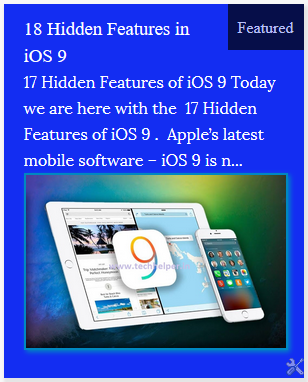
.post-summary { background: #132df2; color: #FFF; padding: 20px; box-shadow: 2px 4px 2px 2px #E4E4E4; margin-top: 19px; padding-top: 10px; } .post-summary a { color: #FFF; font-family: Oswald; font-weight: 100; text-decoration: none; } .post-summary:hover:before { opacity: 1; } .post-summary:before { content: “Featured”; background: #000; opacity: .7; font-family: Lobster; padding: 10px; position: relative; float: right; top: -10px; right: -20px; transition: .3s; } .post-summary .image { box-shadow: 2px 2px 4px 0px #0088C1; border: 2px solid #0088C1; }
Featured Post Widget Style 2
/********************************************
Featured Post
********************************************/
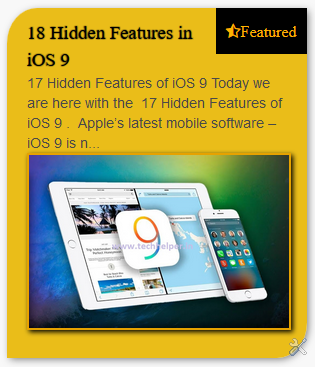
.post-summary:before { content: “f123 Featured”; background: #000; opacity: 1; font-family: Lobster, FontAwesome; padding: 10px; transition: .3s; position: relative; float: right; color: #FFB300; top: -10px; right: -20px; } .post-summary { background: #eabd19; color: #fff; padding: 20px; box-shadow: 2px 2px 7px -1px #777777; margin-top: 19px; padding-top: 10px; border-radius: 10%; border-bottom-left-radius: 0%; border-top-right-radius: 0%; } .post-summary a { color: #000; font-family: Oswald; font-weight: 100; text-shadow: 0px 0px 1px #000; text-decoration: none; } .post-summary p { color: #4A4A4A; font-family: sans-serif; font-size: 14px; line-height: 20px;} .post-summary .image { box-shadow: 2px 2px 4px 0px #000000; border: 2px solid #E6A200; } .post-summary:hover p { color: #000; }
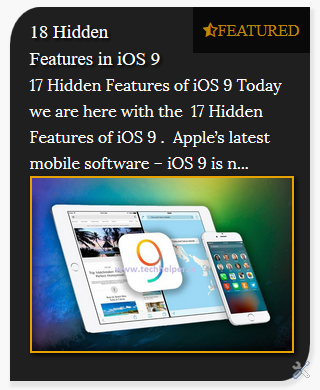
Featured Post Widget Style 3
/********************************************
Featured Post
********************************************/
.post-summary { background: #1F1F1F; color: #FFF; padding: 20px; box-shadow: 2px 4px 2px 2px #E4E4E4; margin-top: 19px; padding-top: 10px; border-radius: 10%; border-bottom-left-radius: 0%; border-top-right-radius: 0%; } .post-summary:before { content: “f123 Featured”; background: #000; opacity: .7; font-family: Oswald, FontAwesome; padding: 10px; position: relative; float: right; color: #FFB300; top: -10px; right: -20px; text-transform: uppercase; } .post-summary a { color: #FFF; font-family: Oswald; font-weight: 100; text-shadow: 2px 2px 2px #000; text-decoration: none; } .post-summary .image { box-shadow: 2px 2px 4px 0px #000000; border: 2px solid #E6A200; } .post-summary:hover:before { opacity: 1; }
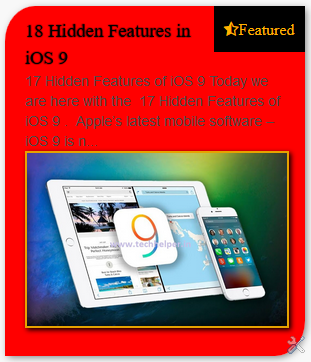
Featured Post Widget Style 4
/********************************************
Featured Post
********************************************/
.post-summary:before { content: “f123 Featured”; background: #000; opacity: 1; font-family: Lobster, FontAwesome; padding: 10px; transition: .3s; position: relative; float: right; color: #FFB300; top: -10px; right: -20px; } .post-summary { background: #FF0000; color: #000000; padding: 20px; box-shadow: 2px 2px 7px -1px #777777; margin-top: 19px; padding-top: 10px; border-radius: 10%; border-bottom-left-radius: 0%; border-top-right-radius: 0%; } .post-summary a { color: #000; font-family: Oswald; font-weight: 100; text-shadow: 0px 0px 1px #000; text-decoration: none; } .post-summary p { color: #4A4A4A; font-family: sans-serif; font-size: 14px; line-height: 20px; } .post-summary .image { box-shadow: 2px 2px 4px 0px #000000; border: 2px solid #E6A200; } .post-summary:hover p { color: #000; }
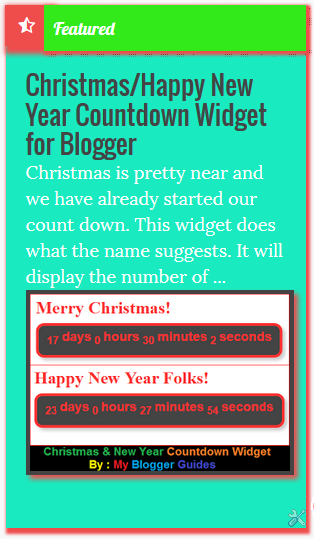
Pro Looking Featured Post Widget Style 5
/********************************************
Featured Post
********************************************/
.post-summary { background: #19eac0; color: #fff; padding: 20px; box-shadow: 2px 4px 2px 2px #EF4C4C; margin-top: 19px; padding-top: 20px; font-size: 18px; } .post-summary:before { content: “Featured”; background: #32ea19; font-family: Lobster; width: 93%; padding: 10px; position: relative; overflow: hidden; float: right; z-index: 10; top: -20px; right: -20px; box-shadow: 2px 2px 2px 2px #EF4C4C; transition: .3s; } .post-summary:after { content: “f123”; position: relative;
font-family: FontAwesome; box-shadow: 2px 2px 2px 2px #EF4C4C; background: #EF4C4C; top: -482px; left: -20px; padding-left: 14px!important; padding: 11px; padding-right: 14px!important; } .post-summary a { color: #444444; font-size: 26px; font-family: Oswald; font-weight: 100; text-decoration: none; } .post-summary .image { box-shadow: 4px 4px 4px 0px #EF4C4C; border: 4px solid #444444; }
Credit:
.FeaturedPost .post-summary{
display:flex;
flex-direction:column;
}
.FeaturedPost img{
order:1;
}
.FeaturedPost h3{
order:2;
}
.FeaturedPost p{
order:3;
}
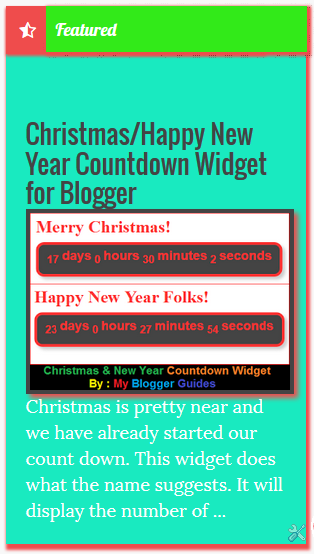
You can see in below screenshot that we have changed order of title, image and description by using above code. If you want to change then you can also use it as mentioned above.
Our Recommended Blogger Widgets
- WordPress Like Floating Social Sharing Widget for Blogger with Counter.
- AllInOne Admin Box Widget with Social buttons and Subscription Box.
- Add Sticky Notification Bar To Blogger with Show/Hide Button.
- Stylish Contact Form For Blogger! Add to Static Page, Responsive & Pro Version.
- Cute & Stylish Email Popup Subscription Widget.
Conclusion:
Thank You! Stay Blessed!
Contents


Nice post ever, I hope you always write a good article. And your blog article is very informative.
http://www.mybloggertools.com/