

How to Add Featured Post Widget to Blogger Sidebar
Finally Blogger introduce a new tool called Featured Post Widget to display your highlight content on their own blogs. The Featured Post Widget is a fully customizable widget, that displays a single post from your blog. You can decide, whether or not to show the post thumbnail and post title. With Featured Post, you can choose a post from your blog and highlight them wherever you’d like.


Whether you are re-sharing a amazing story you wrote few years back, you want to put maximum attention on a promotion you are running or you want to revive various posts from the achieve, the Feature Post gadget is a best way to showcase the content that matters the most. This is a good widget but there are also some cons of this widget.
Cons of Blogger Featured Post Widget
- It’s default style is so simple and so, it can make a bad impression on the eyes of your visitors;
- We can’t change the length of summary;
- We can’t choose or upload a custom image to show their (on the widget).
Don’t worry guys there are also some Pros of this widget:>>
Pros of Blogger Featured Post Widget
- It’s fast loading and needs no .JS or external coding;
- It’s an awesome way to show off a particular post and right on the front a person (your visitor);
- You can use as much CSS you want on it.
In this Post We are going to share only How to add it on Blogger Blog and we promise we will share some stylish featured post codes as soon as possible by which you can give pro look to this widget. Now add this widget.
How to Add Featured Post Widget to Blogger
- To add Featured Post Tool go to Blogger >> Layout >> Add a Gadget >> and select “Featured Post”.

- The tool provides you a plenty of user friendly options to select a specific posts. You can either search the title of the post or you can browse through different labels (categories) to find a post that matters the most.
- The gadget also offers a small preview of how the post will appear on your blog. You can choose to hide the image or title of the post or even both.
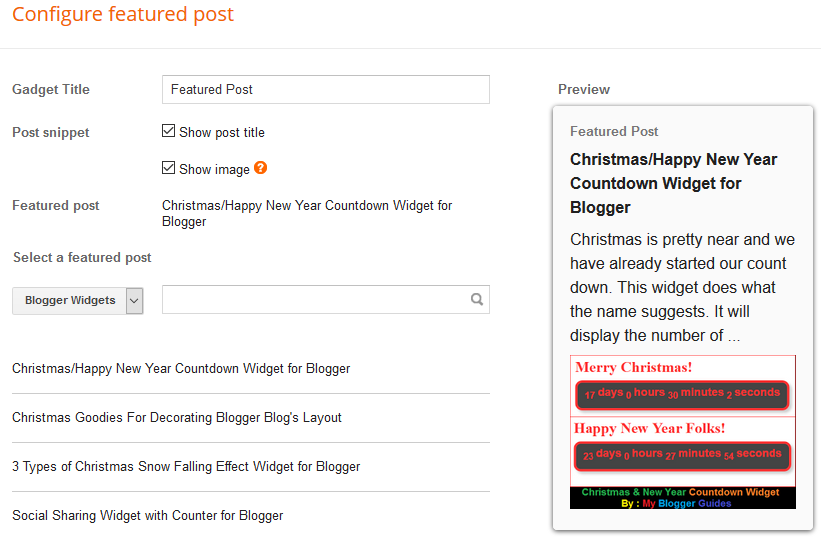
- Once you have selected a post and you thinks it is best fit, press Save button.
- That’s it. Enjoy and wait for our next post in which you can find some stunning skins for this widget.
Conclusion:
So above guide is about How to Add Featured Post Widget to Blogger Sidebar? Overall this was just a good update but not solid for me i.e. you can limited to select one post to show as featured post, but we’re excited to see what happens next. But we want to hear from you! How do you like the new widget? Let us know in the comments below. We hope by this complete guide you can easily add this widget on your blogger blog. If anyhow problem persist after following all steps then also drop a comment below for ask. Thank you. Now It’s your turn to share this post on social networking sites. Do subscribe.
Contents
