

Ideal Blog Post Length: A Writer’s Guide
There’s a lot of confusion online about the ideal blog post word count on the internet.
Let me make it very clear to you, there’s no right or wrong answer to this question. However, in this article, I’ll share with you a study that is backed by research done over millions of articles, so you can clearly understand what range of word count is perfect to rank on the first page of Google.
So without wasting any further time, let’s dive straight into the article.
Is There An Ideal Blog Post Length?
There’s no perfect answer to this question; however, fairly longer articles tend to do better in Google’s search results.
Keeping that in mind, please don’t make writing long articles your main focus. If you put all your efforts into fulfilling users’ search intent, you have a much higher chance of ranking in the top search results.
It doesn’t matter if the article takes 1000 or 4000 words to answer the search query. If the end user is satisfied after reading your article, Google will naturally rank you at the top.
What Is The Ideal Blog Post Length?
Since you’ve come here to know exactly this, I’ll answer it for you.
Anywhere between 1500 to 3000 words is an ideal blog post length.
Smaller articles tend not to perform as well in search results, as this study from Backlinko shows that the average word count for top-ranking Google pages is around 1447.
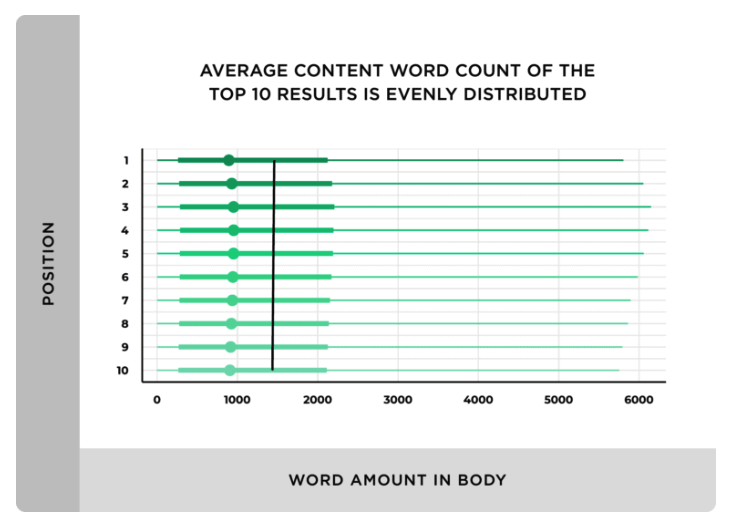
Finding the right word count for any article depends a lot on the niche you’re in, the topic that you’re covering, and the target audience.
Niche: Some niches attract high-quality backlinks and social shares only if the articles are longer. For other niches, the opposite works.
Content Type: Word count really matters on what topic you’re covering. How-to articles, resources, and guides typically have higher word counts than review or news articles.
Target Audience: Understand your audience, whether they like reading longer articles or are happy with short ones. Ask them in comments or in emails. Collect the data and act accordingly.
Ideal Blog Post Length For Various Content Types
In this section, we will see the ideal word count range for various content types.
#1. Regular Blog Posts
The recommended word count length for a regular blog post is usually around 1000-2000 words.
The main reason a regular blog post ranks on Google is high-quality backlinks and social shares. Both of these can be achieved only if the article is well-written and based on comprehensive research.
#2. Pillar Pages/Posts
The recommended word count length for a pillar page is usually around 3000+ words.
Pillar pages are in-depth articles that require extensive research and analysis; hence, they need a higher word count.
#3. How-to Guides
The recommended word count length for a how-to guide is usually around 1500-3000 words.
How-to articles are step-by-step guides that explain even the smallest things in detail. To explain things in detail, you need to write an in-depth article, hence a higher word count.
#4. Case Studies
The recommended word count for a case study is 500-1500 words.
A case study is a real-life situation presented in the form of an article; therefore, it doesn’t require many words. One case study can be easily explained in 1500 words or fewer. Of course, exceptions are always there.
#5. Press Release
The recommended word count for a press release article is 300-400 words.
Press releases are very short and don’t cover much information. They are written with a specific purpose in mind; hence, they are always kept short.
#6. News Articles
The recommended word count for a news article is 600-1000 words.
Like press releases, news articles are also kept short and concise. New articles are very trend-driven; hence, writing longer articles doesn’t make any sense.
A study by Clearvoice, based on over 24 million articles, found that certain categories on the internet, like books and literature, marketing and advertising, have the highest percentage of 3000+ word articles compared to the legal, real estate, and pets niches.
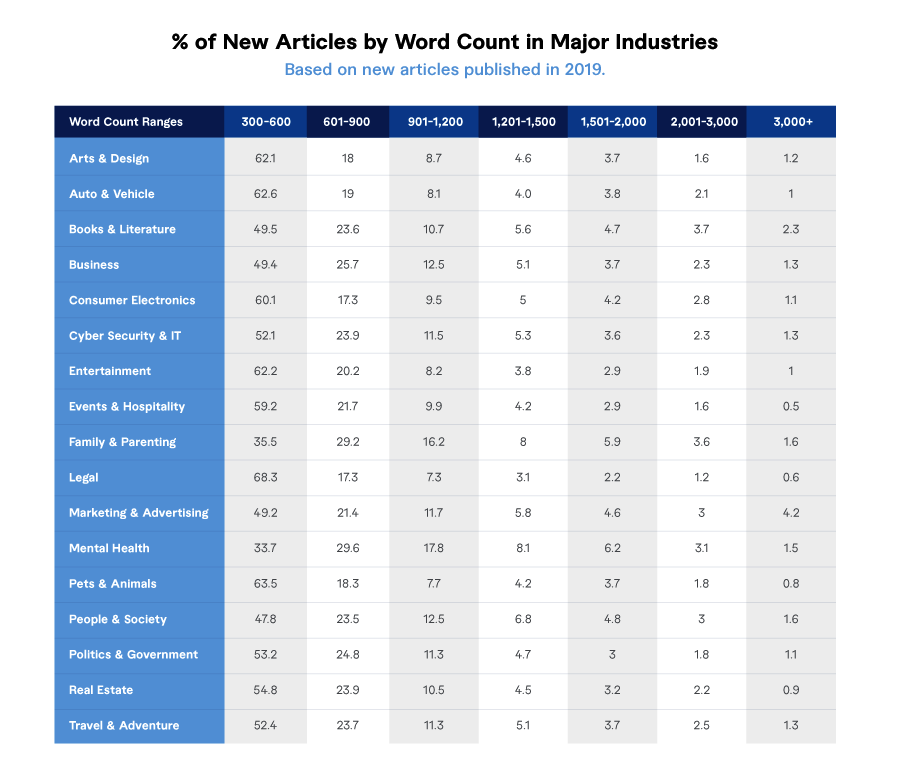
This is a generalised study to give you an idea. Please don’t write unnecessarily long articles, and always keep your number one focus on fulfilling users’ search intent.
Is Word Count A Direct Ranking Factor?
The plain answer is absolutely not.
Google has clearly stated that word count is not a direct ranking factor. However, having a well-crafted article with a good word count that solves a user query indirectly improves ranking.
If that’s the case, why does everyone have this question of more word count equals better rankings? This is mainly because more word count attracts higher social shares and more high-quality backlinks.
All of this shows Google that your article is rank-worthy and, hence, it indirectly results in higher search rankings.
The main focus for a website owner or blogger should be on fulfilling user intent, writing content that’s original, relevant, helpful, and that also offers a great user experience.
Lastly, aim to cover the entire topic in depth to increase your odds of ranking higher.
How Do Long Articles Get Higher Rankings?
As discussed above, longer articles don’t dictate higher rankings; however, they have an immense effect on other SEO factors, which helps you rank in search results.
#1. Lower Bounce Rate
Longer articles encourage users to read more and stay longer on your website, thereby increasing dwell time and reducing bounce rate.
If a user spends more time on your website, it signals to Google that they are enjoying what they are reading. These signals later help you in higher search rankings.
#2. Improves conversion rate
Long-form articles help in improving conversion rates, mainly because you have the opportunity to showcase your expertise in that article and build trust with the audience.
You can explain anything in detail, and after you’ve fulfilled their search intent, you can easily pitch them your product or service.
#3. Better Internal Linking
Bigger articles give you more opportunities to interlink your existing articles. More internal linking is like passing the link juice from your best pages to new pages that are still trying to rank.
Better internal linking is also a proven direct ranking factor with Google.
Do Longer Posts Attract More Backlinks?
Absolutely, long articles typically attract many new backlinks.
A Backlinko content study found that 77% of long-form articles attract more backlinks than short-form articles.
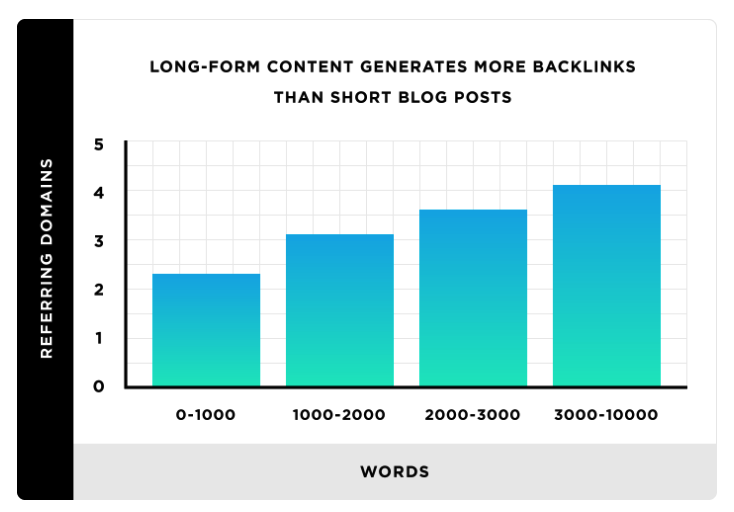
As you can see, articles with over 3000 words attract 3 or more backlinks.
Writing long-form content is indirectly beneficial for your rankings because it attracts more backlinks and lowers your bounce rate.
The same study also shows that longer blog posts receive more social shares than shorter articles.
However, articles with over 2000 words don’t attract as many social shares compared to articles with around 2000 words or fewer.
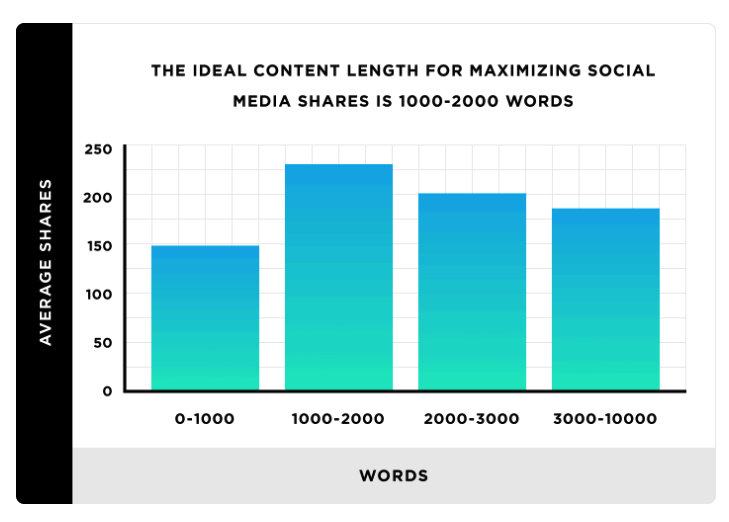
As you can see in this image, the sweet spot to get maximum social shares is around 1000-2000 words.
How To Optimize Posts For Higher Search Rankings?
If you really want to rank higher in search results, stop focusing on word count and focus on these factors instead.
#1. Focus on long-tail keywords
Do what others are overlooking. Focus your attention on long-tail keywords; they are easy to rank for and get you the most amount of high-quality targeted traffic.
#2. Master Search Intent
Take some time and understand keyword search intent. Figure out whether the content of the keyword you’re trying to rank for needs to be informational or commercial.
#3. Do Guest Posting
Naturally send outreach emails for guest blogging and acquire high-quality do-follow backlinks.
#4. Use Topic Clustering
If your blog is about SEO, use the topic cluster strategy to cover everything under SEO.
Create pillar pages to support articles and use internal linking.
#5. Promote Content
Social shares are not a direct ranking factor, but they definitely help. Promote your articles on social platforms like Facebook and LinkedIn, as well as on social forums like Quora.
If you focus on the following factors and couple them with a long-form, high-quality article, no one can stop you from ranking high on Google.
How To Increase Word Count The Right Way?
If you’re looking to legitimately increase the word count in an authentic way, follow the steps below to give your readers the best reading experience.
#1. Calculate Average Word Count
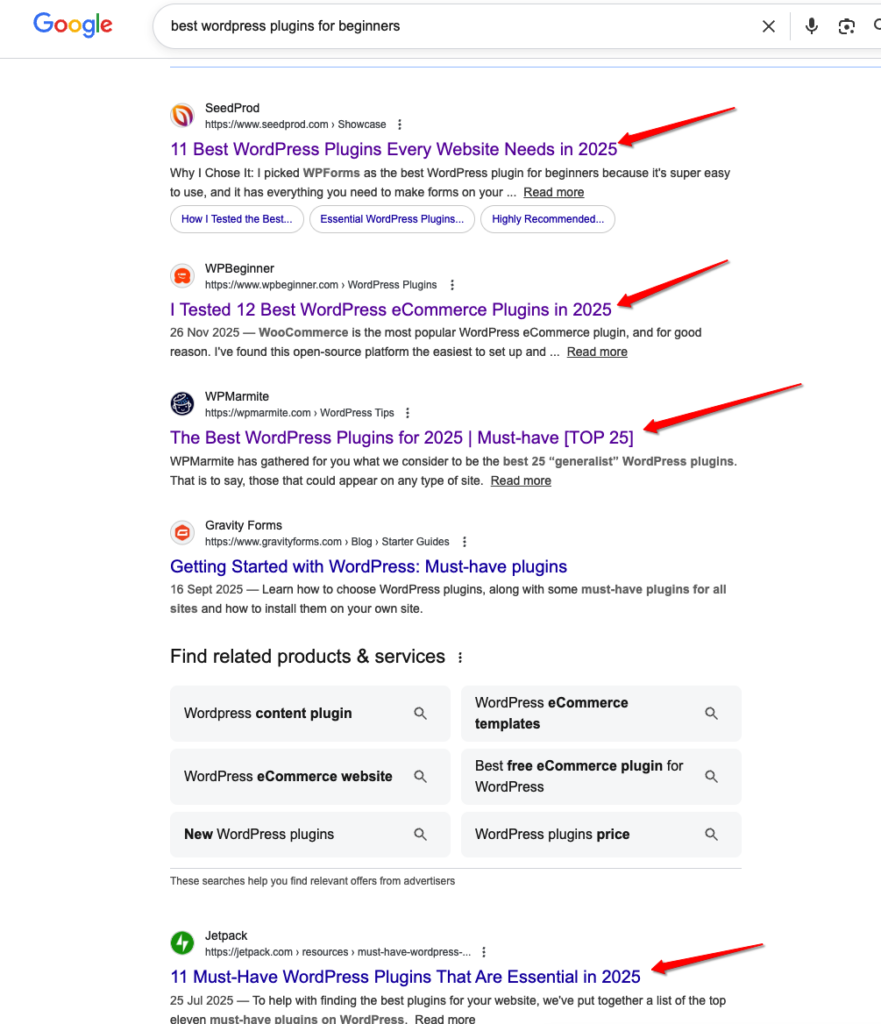
Head over to Google and search for your main keyword.
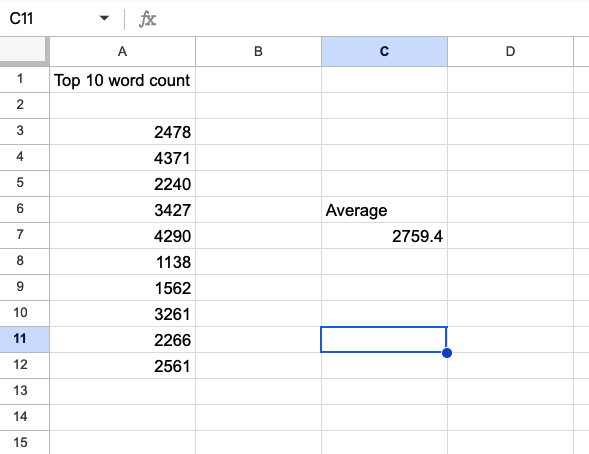
Next open the top 10 search results and take out the word count of these articles. Note that down in an excel sheet. Finally take out the average word count of these 10 articles.
This now becomes your base count for writing a good article. If you can add more information without adding fluff, better.
In this example, I have searched for “best wordpress plugin for beginners”. As you can see I see exact search results and my next step is to open these articles and add their word count in an excel sheet.
Now take an average of these articles and get your sweet spot word count number.
#2. Borrow Subheadings From Your Competitor
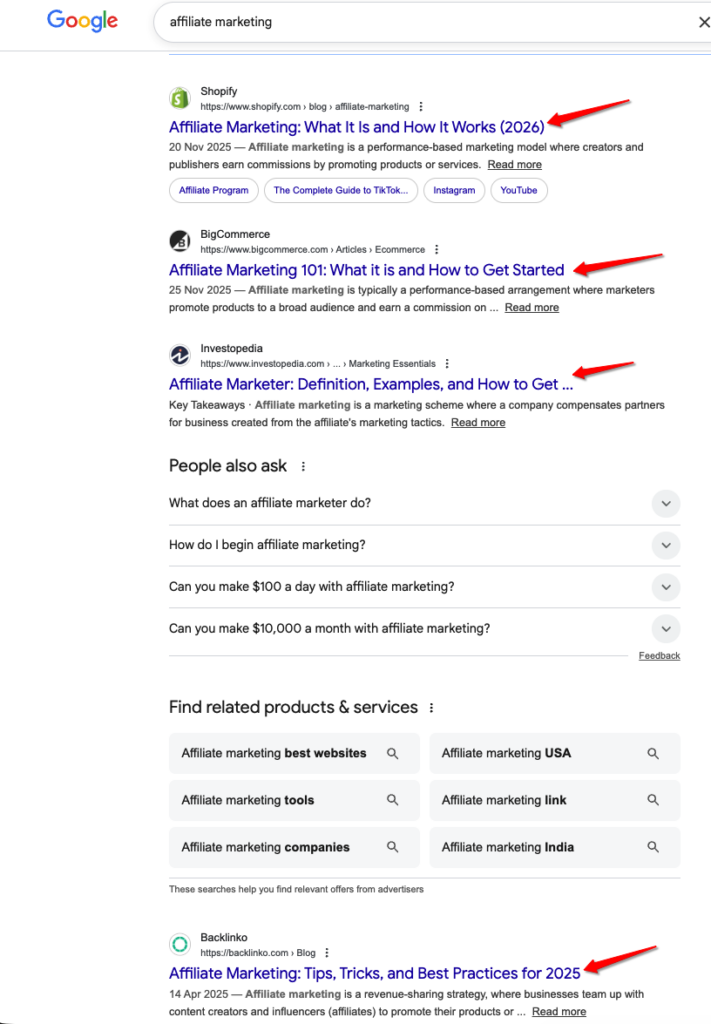
Similar to how we checked for word count, in this step we will borrow headlines from the top 10 search results and make a list of these headlines in a document.
Doing this simple activity ensures you cover all the important headings in your articles giving you the best shot at making it to the top of the search results.
In this example the keyword is “affiliate marketing”, I’d open each website and see their table of content. I’ll then spot the most common subheadings and also the unique ones. Finally. I’ll make a full list of these headings in a fresh Google doc.
#3. Put Your Focus On Reader Retention
After you’ve made your list of subheadings that you’d want to cover in an article, the next step is to cover things that will help you retain readers for longer.
– Include Table of Contents
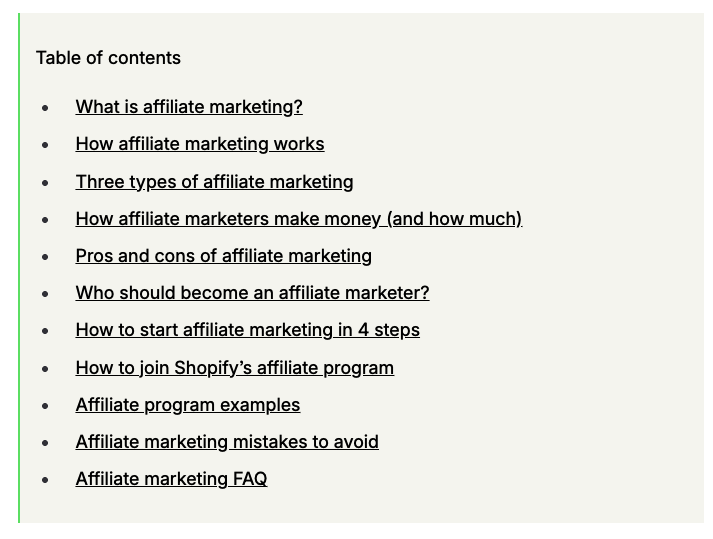
Always I mean always have a table of content included in your article this way users exactly know what they are reading. It also directly helps in user retention.
– Include Images and Videos
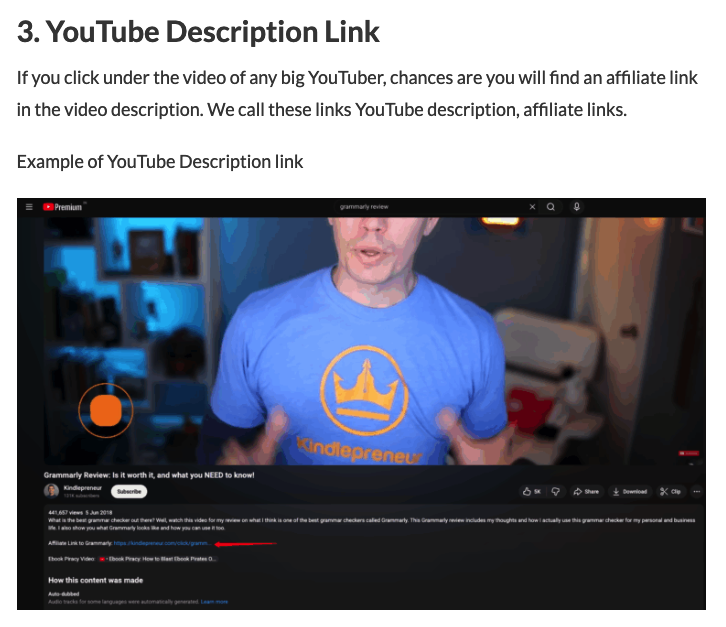
Add lots of images and tutorial videos in the articles. Add images with titles and description which helps with user retention too.
– Add Related Articles

Randomly add related article links in your main article. Give readers to open more articles on the website and read them. Again this directly helps with user retention.
– Add A FAQs Section
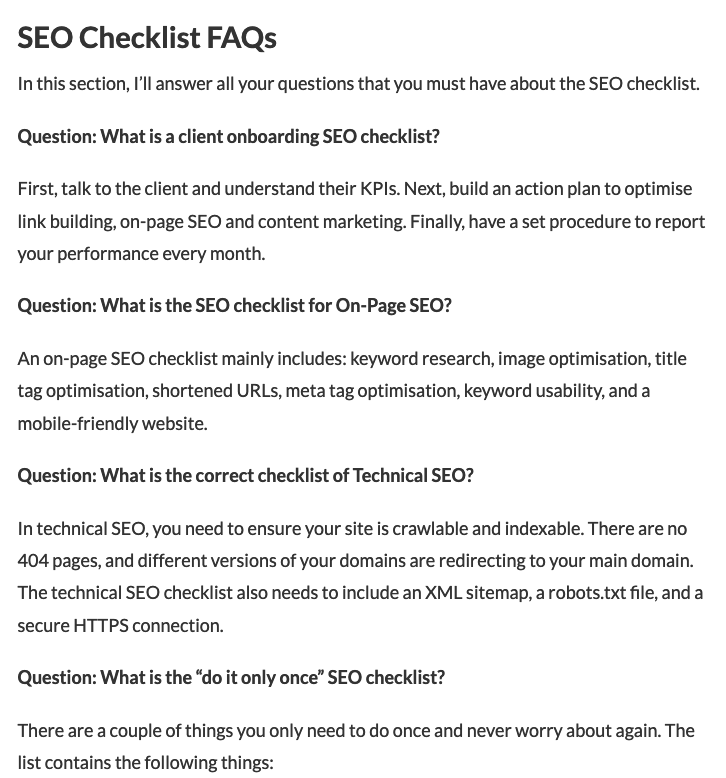
At the end of each article be sure to add in a FAQ section and cover all the questions that a user must have. It helps you in a couple way, firstly, you can directly rank if someone is asking a question as their search query in Google. Secondly, you’re solving user intent that indirectly helps in ranking too as the end user spends more time on the site.
Perfect Blog Post Length: FAQs
Let’s cover some of the common questions everyone must have.
Question: Is there an ideal blog post length?
No, but ideally, the blog post should be 1500-2500 words. It all depends on the topic, niche and the kind of content you’re writing.
Question: Why are longer posts better for SEO?
You can use keywords correctly, demonstrate expertise, fulfil search intent, and attract backlinks, which can lead to higher search rankings.
Question: How do I decide the length of my blog post?
Focus on search intent. What does the keyword demand? Are you writing a how-to guide or just covering the news?
For informative articles, keep it to 2000-3000 words; news articles should be 300-600 words; and reviews should be 1500-3000 words.
Question: Should I force myself to write longer posts?
Please don’t.
You’ll naturally produce low-quality content trying to force yourself to write longer-form content. Instead, focus on fulfilling users’ search intent, and you’ll be good.
Final Words:
Really appreciate you taking the time and read this article on what’s the ideal length of a perfect blog post.
Remember, there’s no right answer to this question. The right length and word count completely depend on the topic you’re covering.
Focus on writing the highest-quality content, using images and internal linking, and give your users the best reading experience. If you do the following, you place yourself in the top picks for Google to rank higher in search results.
If you have any suggestions for me after reading the article, please feel free to drop it in the comments, and I’ll see you in the next one.
Contents
