

Allow/Disallow Enable/Disable Comments on Blogger Posts
We have also shared a lot of Blogger widgets. Want to have a look? Click Here.
Why To Allow Or Disallow Comments?
 |
| Allow or Disallow Comments |
If You Allow Or Disallow Comments on your posts in blogger, You let your visitors respond your post or forbid them to leave their comments. The comments are actually the remarks that your visitors leave regarding your post, product, service, idea, and thoughts. If you allow comments, you let the people tell whether your content is reliable and authentic or not. The positive comments enhance the worth of your post, and they help others read, trust, and share your post. But sometimes you do not need further comments, your product is out-of-stock, or the content that you have provided in your post has become outdated. So you disallow the comments to stop further discussion on the specific topic. Therefore, I am going to tell you how to allow or disallow comments on your post to set post-wise comments settings.
How To Allow or Disallow Comments in Blogger Posts
- Go to blogger Dashboard:
- Click On Edit On that Page or Post you want to allow or disallow comment box.
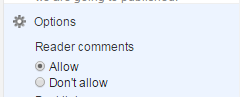
- Click Options in the right-hand menu of your post editor.
- If you open a new post, here you will get options Allow and Don’t allow.

- If you open an already existing post, you will get options: Allow, Don’t allow, show existing, and Don’t allow, hide existing.
- Allow lets you permit comments in your post. Don’t allow forbids new comments, but shows previous comments. But the third option not only forbids new comments, but also removes already existing ones. This means by allowing them, you are letting your audience discuss the topic with strong arguments. But with don’t allow, you prevent further discussion, but may or may not show the existing remarks and feedback.

Conclusion:
Contents
