
How To Hide/Show Blogger Widgets in Mobile View?
If you have ever tried to access your blog from a mobile device then you might familiar with blogger provides a mobile responsive template which is greatly responsive. When it comes to customizing a blog’s design, Blogger users also tend to prefer having at least some control over how their site is going to look like when viewed from a mobile device and not just from a desktop or laptop screen. There are also certain widgets which do not look good on mobile view whereas they look nice on desktops or tablets with wide screen so that in that situation you can simply hide those widgets from your blog only for mobile view or you can show some specific widgets only for mobile view not for big screens. Today, in this article, we will show you how to hide or show blogger widget in mobile view?

How To Hide or Show Blogger Widgets in Mobile View

Below are the steps you need to follow in order to hide or show blogger specific widgets on mobile view and customize your blog for different screens before applying any condition in blogger template you would have to know Widget ID. So here is How To Find Widget ID in Blogger?
How To Find Widget ID in Blogger?
In case your blog is not showing any of your widget on mobile view, follow the instructions that we have mentioned below:
Go to Blogger >> Template >> Layout. Now click on Edit button of widget which you want to show on your blogger template.
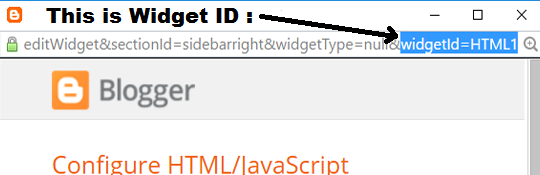
Now you need to look for Widget ID which would be in the URL of your selected widget. In the URL look for widgetId it would be towards the end of the URL. If you cannot find the Widget ID then simply Copy the title of the widget and if there is no title then give a title for time being, just for the sake of search.
Now lets start understanding How To Hide Blogger Widgets in Mobile View?
How To Hide Blogger Widgets in Mobile View?
Go to Template >> Edit HTML >> Search for widget coding using Widget ID which you’ve copied in above step or widget title.
This will lead you to the the widget coding, now add mobile=’no’ in the widget code just after the locked=’false’. Refer the below screenshot to add it correctly.

Then Click on Save template button and you are done.
How To Show Blogger Widgets in Mobile View?
Go to Template >> Edit HTML >> Search for widget coding using Widget ID which you’ve copied in above step or widget title. (Quick Tip: You can use “Jump to widget” option available in template editor to get to the code of any widget that you like).

This will straight take you to the widget coding, now add mobile=’yes’ in the widget code just after the locked=’false’. Refer the below screenshot to add it correctly.
Our Recommended Blogger Widgets
- WordPress Like Floating Social Sharing Widget for Blogger with Counter.
- AllInOne Admin Box Widget with Social buttons and Subscription Box.
- Add Sticky Notification Bar To Blogger with Show/Hide Button.
- Stylish Contact Form For Blogger! Add to Static Page, Responsive & Pro Version.
- Cute & Stylish Email Popup Subscription Widget.
Conclusion:
So above guide is about How To Hide or Show Blogger Widgets in Mobile View? We hope this article helped you in learning how to show or hide widget on mobile in blogger. If you have any queries or confusion left related to this article then lend your queries in the comment box. We will help you out of sure. Don’t forget to subscribe us. Do Share.
Contents
