
How To Change Comments Avatar Size in Blogger
In previous tutorial we have shared How To Change Default Anonymous Avatar in Blogger Comments and now in this post going to share How To Change Avatar Size in Blogger Comments. Default size of Avatars in Blogger comments is 36px… pretty small considering that a lot of sites these days are using much larger avatars. So today we are here with very simple trick by using which you can easily customize avatar size of blogger comments. To change the style and size of avatars is very easy – you just need to add the CSS code in your Blogger template that will make size of avatars to have width and height of 64px.


This is a Quick Trick to Show the Blogger Comment Avatar Image Properly. Here we are going to tell you simple trick to modify the avatar size of blogger comments. So follow all steps carefully.
Change Blogger Comments Avatar Size
- Go to Blogger>Template >Edit HTML.
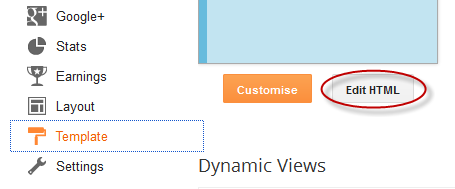
- Now click anywhere inside the code area and search for ]]></b:skin> tag by pressing CTRL+F.
- Now paste following code just above of this tag.
Note: you may need to click on the arrow next to it and then search this tag again
- Depending on which comment system you use (with reply/no reply), copy and paste one of the following codes just above it:
For Blogger Threaded Comment System
.comments .avatar-image-container{
background-color: rgb(34, 34, 34);
border:1px solid #ccc;
margin: 0px 10px 0px 0px;
padding: 0px 0px 0px 0px;
width: 64px;
max-height: 64px;
}
.comments .avatar-image-container img{
margin: 0px 0px 0px 0px;
padding: 0px 0px 0px 0px;
max-width: 64px;
height: 64px;
}
For Old Blogger Commenting System
.avatar-image-container{
border:1px solid #d6d6d6;
margin-left: -30px;
-moz-border-radius: 4px;
background:#fff;
height:70px;
min-height: 70px;
width:70px;
min-width:70px;
}
.avatar-image-container img {
background: url(http://2.bp.blogspot.com/-gcjQ0sgWw7M/T6WpkK4S5AI/AAAAAAAACEQ/hYAWpCPl6P0/s200/anonymous.jpg);
background-repeat: no-repeat;
background-position: center;
background-size: 100%;
width:70px;
min-width:70px;
height:70px;
min-height:70px;
}
Note: For bigger/smaller avatars, change the values in red. To change the anonymous avatar, replace the URLs in blue with your own. (works only for the old commenting system i.e. that has no reply option)
- Click on Save Template.
- That’s it. You are done. View your Blog to see the result.
Our Recommended Blogger Widgets
- WordPress Like Floating Social Sharing Widget for Blogger with Counter.
- AllInOne Admin Box Widget with Social buttons and Subscription Box.
- Add Sticky Notification Bar To Blogger with Show/Hide Button.
- Stylish Contact Form For Blogger! Add to Static Page, Responsive & Pro Version.
- Cute & Stylish Email Popup Subscription Widget.
Conclusion:
So above guide is about How To Change Avatar Size in Blogger Comments? We hope by this complete guide you can easily customize the avatar size of your blogger commenting system. If anyhow problem persist. Let us know. Just drop a comment below. Our team member help you out of sure. Now share this post and subscribe us for more blogger tricks. Do Share.
Thank You! Stay Blessed!
Thank You! Stay Blessed!
Contents
