
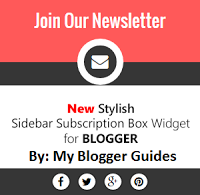
Stylish Sidebar Subscription Box Widget For Blogger
Features of This Subscription Box Widget:
- This is Fully Responsive.
- You can easily customize text content and colors.
- Use of Font awesome icons with cool Hover effect.
- Social Profiles’s Links in then bottom.
- Loading Fast because we make it with pure CSS and HTML.
- There is no need to mention but is is too stylish. 🙂
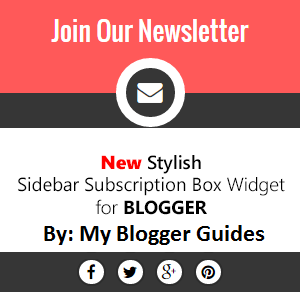
How To Add Sidebar Subscription Box Widget To Blogger Blog?
Steps for Adding Sidebar Subscription Box Widget to Blogger
- Go to Blogger Dashboard.
- Template >> Edit HTML
- By pressing CTRL+F search for </head> tag and paste below font awesome icons link just below of this tag.
<link href=’http://netdna.bootstrapcdn.com/font-awesome/4.3.0/css/font-awesome.css’ rel=’stylesheet’/>
- Now save your template.
- Now Go To Layout.
- Add A Gadget >> HTML/JavaScript.
- Now copy below code and paste it.
<style>
/* —————————————————-
Sidebar Subscription Box Widget = V.1
Designed by :: https://mybloggerguides.com
Keep These Credits Intact, Do Not Remove
—————————————————–*/
#mbg-blogger-sbox-v1 {
padding: 0;
padding-bottom: 5px;
font-family: inherit;
display: block;
margin: 0;
width: 100%;
border-radius: 1px;
border: 0;
background: #363636;
}
#mbg-blogger-sbox-v1 .main_tagline {
padding: 0px 0px;
line-height: 2.5em;
font-size: 26px;
margin: 0;
height: 95px !important;
overflow: hidden;
font-weight: normal;
color: #FFF;
text-align: center;
border: 0;
background-color: #FF5959;
}
#mbg-blogger-sbox-v1 .email_icon {
display: table;
margin: -35px auto 0px;
font-size: 25px;
padding: 12px;
height: 25px;
width: 25px;
background-color: #363636;
color: #FFF;
border-radius: 50px;
border: 10px solid #FFFFFF;
line-height: 0;
}
#mbg-blogger-sbox-v1 p {
font-size: 15px;
color: #F9F9F9;
text-shadow: 0px -1px 0px #000;
line-height: 27px;
padding: 5px 10px 5px;
text-align: center;
width: 80%;
margin: 5px auto 20px;
border-bottom: 2px solid #6A6A6A;
border-radius: 20px;
}
#mbg-blogger-sbox-v1 .rssform {
padding: 0;
margin: 0 auto;
display: block;
}
#mbg-blogger-sbox-v1 .rssform input {
padding: 8px;
margin: 20px auto 15px;
font-size: 13px;
color: #000;
text-align: center;
display: block;
font-family: inherit;
font-weight: normal;
width: 90%;
height: 38px;
text-transform: uppercase;
outline: none !important;
border: 1px solid #FFFFFF;
border-radius: 1px;
background-color: #FCFCFC;
box-sizing: border-box !important;
}
#mbg-blogger-sbox-v1 .rssform .button:hover {
background: #000000;
}
#mbg-blogger-sbox-v1 .rssform .button {
background: #FF5959;
color: white!important;
border: 1px solid #FFFFFF;
margin-top: 15px;
outline: none !important;
transition: all .3s ease-in-out;
padding: 5px 2px !important;
float: none;
text-transform: uppercase;
font-size: 18px;
font-weight: normal;
cursor: pointer;
}
#mbg-blogger-sbox-v1 .bottom_lock_policy {
background: url(http://2.bp.blogspot.com/-v_yWrspBzH4/VhpbIzTtMjI/AAAAAAAAD0g/gYEKGkw6VFQ/s1600/Lock-mybloggerguides.png) no-repeat 3% -2px;
color: #959595;
text-align: center;
font-size: 12px;
margin: 0;
padding: 3px;
line-height: 25px;
}
#mbg-blogger-sbox-v1 .bottom_lock_policy a {
color: #959595;
text-decoration: none !Important;
}
#mbg-blogger-sbox-v1 .social_profiles {
line-height: 1.2em;
display: table;
float: none;
margin: 0px auto;
text-align: center;
min-width: 157px;
padding: 5px 0px;
border: 0;
}
#mbg-blogger-sbox-v1 .social_profiles a:hover {
color: #FFF;
background-color: #FF5959;
border-color: #FFF;
}
#mbg-blogger-sbox-v1 .social_profiles a {
color: #000000;
margin: 0 5px;
text-align: center;
float: left;
display: table;
padding: 4px 5px;
background-color: #FFFFFF;
border-radius: 50px;
border: 2px solid #2D2D2D;
width: 15px;
height: 15px;
line-height: 0;
font-size: 16px;
transition: all 0.3s ease-in-out;
-webkit-transition: all 0.3s ease-in-out;
}
#mbg-blogger-sbox-v1 form {
margin-bottom: 10px !important;
}
</style>
<div id=”mbg-blogger-sbox-v1″>
<div class=”main_tagline”>Join Our Newsletter</div><div class=”email_icon”><i class=”fa fa-envelope”></i></div>
<p>Get All The Latest Updates Delivered Straight Into Your Inbox For Free!</p>
<div class=”rssform”>
<form action=”http://feedburner.google.com/fb/a/mailverify” method=”post” target=”popupwindow” onsubmit=”window.open(‘http://feedburner.google.com/fb/a/mailverify?uri=MyBloggerGuides’, ‘popupwindow’, ‘scrollbars=yes,width=550,height=520’);return true”>
<input type=”text” name=”email” placeholder=”Enter your email address…”>
<input type=”hidden” value=”MyBloggerGuides” name=”uri”>
<input type=”hidden” name=”loc” value=”en_US”>
<input value=”Join Now” class=”button” type=”submit”>
</form>
</div>
<div class=”bottom_lock_policy”>We Respect Your Privacy | <a href=”https://mybloggerguides.com/2015/10/stylish-sidebar-subscription-box-widget-for-blogger.html”>Get This Widget</a> </div>
<div class=”social_profiles”>
<a href=”http://www.facebook.com/MyBloggerGuides” target=’_blank’ rel=’nofollow’ title=”Join on Facebook”><i class=”fa fa-facebook”></i></a>
<a href=”http://www.twitter.com/MyBloggerGuides” target=’_blank’ rel=’nofollow’ title=”Follow on Twitter”><i class=”fa fa-twitter”></i></a>
<a href=”http://plus.google.com/Your URL” target=’_blank’ rel=’nofollow’ title=”Follow on Google+”><i class=”fa fa-google-plus”></i></a>
<a href=”http://www.pinterst.com/paramjotsingh” target=’_blank’ rel=’nofollow’ title=”Follow on Pinterest”><i class=”fa fa-pinterest”></i></a>
</div>
</div>
- Change #FF5959 For changing color scheme.
- Change All Yellow Highlighted Links into Yours.
- Now Save HTML/JavaScript.
- That’s it. You have added this widget successfully.
Conclusion:
Contents
