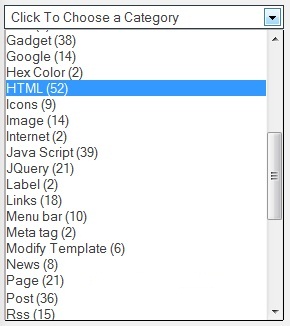
How To Create Drop Down Label On Blogger

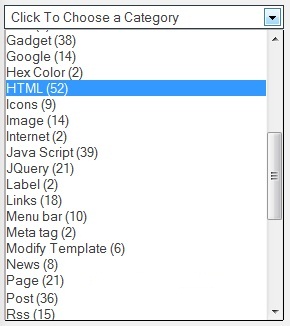
Wondering How To Create Drop Down Label On Blogger including Changing Label With Category Option then you are on right platform. Because today we are going to share a trick by which you can easily create Drop Down Label List On Blogger Blog. This is also great trick for those who are looking for drop-down label Menu. If your blog don’t have much space or want to reduce home page size, then this will help you. So this drop-down menu display your post categories, and labels are link with them. So, each category post are counting too. you can adjust size of the drop-down. If you want to make change in label then follow these steps and add it to your blogger blog.
How To Create Drop Down Label On Blogger

How To Create Drop Down Label On Blogger
  • Go To Blogger Dashboard.
  • Template >> Edit HTML.
  • Make sure you don’t put check mark in  Expand Widget Templates.
  • Find below code by using Ctrl+F.

<b:widget id=’Label1′ locked=’false’ title=’Labels’ type=’Label’/>

  • Now replace above line (where you found) with below code.

<b:widget id=’Label1′ locked=’false’ title=’Categories’ type=’Label’>
<b:includable id=’main’>
<b:if cond=’data:title’>
<h2><data:title/></h2>
</b:if>
<div class=’widget-content’>
<select style=’width:100%’ onchange=’location=this.options[this.selectedIndex].value;’>
<option>Choose a Category</option>
<b:loop values=’data:labels’ var=’label’>
<option expr:value=’data:label.url’><data:label.name/>
(<data:label.count/>)
</option>
</b:loop> </select> <b:include name=’quickedit’/> </div> </b:includable>
</b:widget>

  • You can change the wdth of drop-down by changing 100%
  • You can change Choose a Category as your like, if you want.
  • If you want to hide the post counter so delete this code.  (<data:label.count/>)
  • Save Template. That’s it.

Conclusion:

So above guide is about How To Create Drop Down Label On Blogger with Changing Label To Category. Hope by this step by step guide you can easily create drop down label and change name to category. If problem persist after following all steps then ask us, we will help you out of sure. Do share and give feedback.

Contents

Paramjot Singh
 

I’m Paramjot Singh, the creator of mybloggerguides.com. I started this blog back in 2016 to share my real experiences from the world of blogging – the wins, the failures, and everything in between. Originally from India and now living in Australia, I’ve spent years learning how blogging, SEO, and online income actually work in the real world. On My Blogger Guides, I focus on SEO tips, blogging strategies, product reviews, and step-by-step guides for Google’s Blogger platform, so that anyone can start their blogging journey without investing much money. My goal is simple: to make blogging easier, clearer, and more accessible for beginners who want to build something of their own online.

Click Here to Leave a Comment Below 0 comments

Leave a Reply: