
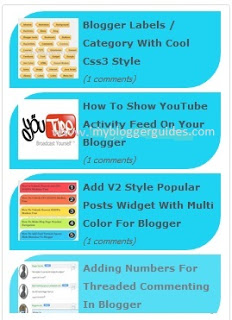
Add Animated Recent Posts Widget to Blogger
 |
| Animated Recent Posts Blogger Widget |
How To Add Animated Recent Posts Widget To Blogger Blog
Steps For Adding Animated Recent Posts Widget To Blogger Blog
- Go To Blogger Dashboard >> Layout.
- Add A Gadget >> HTML/JavaScript.
- Copy Below Code and Paste it.
<script src=”http://ajax.googleapis.com/ajax/libs/jquery/1.3.2/jquery.min.js” type=”text/javascript”></script>
<style type=”text/css” media=”screen”>
<!–
#spylist {
overflow:hidden;
margin-top:5px;
padding:0px 0px;
height:350px;
}
.spydate{
overflow:hidden;
font-size:10px; }
#spylist ul{
width:350px;
overflow:hidden;
list-style-type: none;
padding: 0px 0px;
margin:0px 0px;
}
#spylist li {
width:230px;
background: #1ed2f2;
list-style-type: none;
margin:0 0 5px 0px;
padding:5px 5px 1px 10px !important;
-webkit-transition:all 0.2s ease;-moz-transition:all 0.2s ease;-o-transition:all 0.2s ease;border: 0 none !important;-webkit-border-top-left-radius:40px;-webkit-border-bottom-right-radius:40px;-moz-border-radius-topleft:40px;-moz-border-radius-bottomright:40px;border-top-left-radius:40px;border-bottom-right-radius:40px;
}
#spylist li:hover {
background: #84f6f5;
}
#spylist li a {
text-decoration:none;
color:#4B545B;
font-size:11px;
height:18px;
overflow:hidden;
margin:0px 0px;
padding:0px 0px 2px 0px;
}
#spylist li img {
float:left;
margin-right:5px;
margin-top:3px;
background:none;
border:0;
}
.spycomment{
overflow:hidden;
font-family:Tahoma,Arial,verdana, sans-serif;
font-size:10px;
color:#262B2F;
padding:0px 0px;
margin:0px 0px;
}
–>
</style>
<script language=’JavaScript’>
imgr = new Array();
imgr[0] = “http://i43.tinypic.com/orpg0m.jpg”;
imgr[1] = “http://i43.tinypic.com/orpg0m.jpg”;
imgr[2] = “http://i43.tinypic.com/orpg0m.jpg”;
imgr[3] = “http://i43.tinypic.com/orpg0m.jpg”;
imgr[4] = “http://i43.tinypic.com/orpg0m.jpg”;
showRandomImg = true;
boxwidth = 255;
cellspacing = 6;
borderColor = “#232c35”;
bgTD = “#000000”;
thumbwidth = 70;
thumbheight = 70;
fntsize = 12;
acolor = “#666”;
aBold = true;
icon = ” “;
text = “comments”;
showPostDate = false;
summaryPost = 40;
summaryFontsize = 10;
summaryColor = “#666”;
icon2 = ” “;
numposts = 10;
home_page = “https://mybloggerguides.com/”;
limitspy=4
intervalspy=4000
</script>
<div id=”spylist”>
<script src=’http://dl.getdropbox.com/u/708209/scriptabufarhan/recentspy/recentpostthumbspy-min.js’ type=’text/javascript’></script>
</div><a style=” float:right;font-size:8px; color:#3B78CD; text-decoration:none;” href=”https://mybloggerguides.com”>Blogger widget</a>
- Change mybloggerguides.com into your’s.
- Save HTML/JavaScript.
- That’s it. you have added this recent posts widget in your blogger blog.
Our Recommended Blogger Widgets
- WordPress Like Floating Social Sharing Widget for Blogger with Counter.
- AllInOne Admin Box Widget with Social buttons and Subscription Box.
- Add Sticky Notification Bar To Blogger with Show/Hide Button.
- Stylish Contact Form For Blogger! Add to Static Page, Responsive & Pro Version.
- Cute & Stylish Email Popup Subscription Widget.
Conclusion:
So above guide is about How To Add Animated Recent Posts Widget To Blogger and i hope by using this widget you can attract more readers to your blogger blog. Hope you will like this post. If you have any problem related to this article then drop a comment below. Don’t forget to share on blogging communities and also with your blogger friends.
Thank You! Stay Blessed!
Contents
