
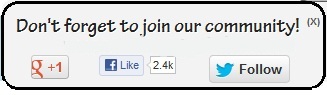
Another Popup Social Media Widget For Blogger
 |
| Popup Social Media Widget |
How To Add Popup Social Media Widget To Blogger
Steps For Adding Popup Social Media Widget To Blogger
- Go To Blogger Dashboard.
- Now Go To Templates >> EDIT HTML.
- Now Search for ]]></b:skin> by pressing CTRL+F
- Now copy below code and paste it just above of this tag.
#socialslide{background:#f3f3f3;border-radius:9px;
-moz-border-radius:9px;-webkit-border-radius:9px;-moz-box-shadow:inset 0 0 3px #333;
-webkit-box-shadow:inset 0 0 3px #333;box-shadow:inner 0 0 3px #333;
padding:12px 14px 12px 14px;width:300px;position:fixed;bottom:13px;
right:2px;display:none;z-index:3;height:65px;}
- Now Save Your Template and Go To Layout.
- Add A Gadget >> Select HTML/JavaScript.
- Now Copy below code and paste it.
<script type=”text/javascript” src=”http://ajax.googleapis.com/ajax/libs/jquery/1.4.4/jquery.min.js”></script>
<script type=”text/javascript”>$(window).scroll(function(){if($(document).scrollTop()>=$(document).height()/4)$(“#socialslide”).show(“slow”);else $(“#socialslide”).hide(“slow”);});function closesocialslide(){$(‘#msocialslide’).remove();$.ajax({type:”POST”,url:”/facebookpage.php”});}</script>
<div style=”display: none;” id=”socialslide”>
<a style=”position:absolute;top:14px;right:10px;color:#555;font-size:10px;font-weight:bold;” href=”javascript:void(0);” onclick=”return closesocialslide();”>(X)</a>
<span style=”font-family: Tekton Pro; font-size: 20px; margin: 10px 0; text-shadow: 1px 1px 0 #FFFFFF;”>Don’t forget to join our community!</span><br />
<div style=”float:left; margin:15px;”><g:plusone annotation=”none”></g:plusone></div>
<div style=”float:left; margin:15px;”><iframe src=”//www.facebook.com/plugins/like.php?href=https%3A%2F%2Fwww.facebook.com%2Fmybloggerguides&send=false&layout=button_count&width=80&show_faces=false&action=like&colorscheme=light&font=arial&height=21″ scrolling=”no” frameborder=”0″ style=”border:none; overflow:hidden; width:80px; height:21px;” allowtransparency=”true”></iframe></div>
<div style=”float:left; margin:15px;”><a href=”https://twitter.com/MyBloggerGuides” class=”twitter-follow-button” data-show-count=”false” data-size=”large” data-show-screen-name=”false”>Follow @MyBloggerGuides</a>
<script>!function(d,s,id){var js,fjs=d.getElementsByTagName(s)[0];if(!d.getElementById(id)){js=d.createElement(s);js.id=id;js.src=”//platform.twitter.com/widgets.js”;fjs.parentNode.insertBefore(js,fjs);}}(document,”script”,”twitter-wjs”);</script></div>
</div>
<div class=’clear’></div>
- Change all highlighted colors.
- Now Save it.
- That’s it. You have successfully added this widget in your blogger blog.
- Now Open your Blog in new tab and enjoy this widget.
Our Recommended Blogger Widgets
- WordPress Like Floating Social Sharing Widget for Blogger with Counter.
- AllInOne Admin Box Widget with Social buttons and Subscription Box.
- Add Sticky Notification Bar To Blogger with Show/Hide Button.
- Stylish Contact Form For Blogger! Add to Static Page, Responsive & Pro Version.
- Cute & Stylish Email Popup Subscription Widget.
Conclusion:
Thank You! Stay Blessed!
Contents
