
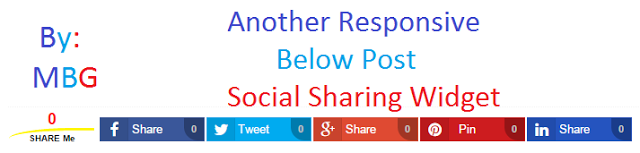
Below Post Responsive Social Sharing Buttons For Blogger
 |
| Below Post Social Sharing Widget |
We have shared a lot of Blogger widgets with you you can find here. These social media buttons are made purely with the help of HTML and CSS Coding, So they don’t effect on page loading timing. Below i’m going to share some features of this social sharing widget with all of you.
Other Social Sharing Widgets
Features Of Responsive Social Sharing Widget:
- This is Fully Responsive.
- Shares counter inbuilt.
- Use Font Awesome Icons.
- 5 Social media sharing buttons are included.
- Made with pure HTML and CSS.
- Easy to install.
How To Add Responsive Social Sharing Buttons To Blogger
- Go To Blogger Dashboard.
- Template >> Edit HTML.
- Press CTRL+F and find <head> Tag and just below of it paste below code.
<link href=’http://netdna.bootstrapcdn.com/font-awesome/4.4.0/css/font-awesome.css’ rel=’stylesheet’/>
<script src=’http://ajax.googleapis.com/ajax/libs/jquery/1.7.1/jquery.min.js’ type=’text/javascript’/>
- Now Find </head> tag by pressing CTRL+F and just above of this paste below code.
<b:if cond=’data:blog.pageType == "item"’>
<style type=’text/css’>
/*————————————————————
Horizontal Social Media Share Buttons for Blogger
Designed by:: https://mybloggerguides.com
Shares Count Code by:: http://donreach.com/social-share-count
issued under GNU GPL Licence
Icons:: FontAwesome
******** Do Not Remove These Credits ********
————————————————————*/
.mbg_horizontal_sharebar {
position: relative;
background: none;
z-index: 2;
width: 100%;
padding: 10px 0;
display: inline-block;
font-family: sans-serif;
margin: 5px 0px;
border-top: 1px dotted rgba(0, 0, 0, 0.05);
border-bottom: 1px dotted rgba(0, 0, 0, 0.05);
}
.mbg_horizontal_sharebar .Share_buttons {
display: block;
}
.mbg_horizontal_sharebar .Share_buttons .wrap {
text-align: center;
margin: 0 auto;
display: inline-block;
min-width: 41px;
}
.mbg_horizontal_sharebar .Share_buttons .wrap1 {
display: inline-block;
width: 31px;
float: left;
}
.mbg_horizontal_sharebar .Share_buttons ul {
margin: 0;
padding: 0;
}
.mbg_horizontal_sharebar .Share_buttons ul li a, .mbg_horizontal_sharebar .Share_buttons ul li a:hover {
color: #FFF !important;
cursor: pointer;
line-height: 25px;
height: 100%;
display: block;
text-decoration: none;
}
.mbg_horizontal_sharebar .Share_buttons ul li {
list-style: none;
list-style-type: none;
padding: 0;
margin: 1px;
float: left;
width: 16%;
max-width: 115px;
display: inline-block;
font-size: 13px;
overflow: hidden;
text-align: left;
height: 25px;
line-height: 25px;
color: #fff;
border: 1px solid rgba(0,0,0,0.04);
-webkit-transition: all 0.4s ease-in-out;
-moz-transition: all 0.4s ease-in-out;
-ms-transition: all 0.4s ease-in-out;
-o-transition: all 0.4s ease-in-out;
transition: all 0.4s ease-in-out;
}
.mbg_horizontal_sharebar .Share_buttons ul li .fa {
color: #fff;
font-size: 17px;
font-weight: normal;
font-family: FontAwesome;
display: inline-block;
text-align: center;
padding: 0;
height: 25px;
line-height: inherit;
width: 30px;
background-color: rgba(0,0,0,0.1);
border-right: 1px solid rgba(0,0,0,0.05);
}
/*–Facebook—*/
.mbg_horizontal_sharebar .Share_buttons .btn_fb {
background: #3a579a;
}
.mbg_horizontal_sharebar .Share_buttons .btn_fb:hover {
background: #314a83;
}
/*–Twitter—*/
.mbg_horizontal_sharebar .Share_buttons .btn_twtr {
background: #00abf0;
}
.mbg_horizontal_sharebar .Share_buttons .btn_twtr:hover {
background: #0092cc;
}
/*–Google Plus—*/
.mbg_horizontal_sharebar .Share_buttons .btn_gplus {
background: #df4a32;
}
.mbg_horizontal_sharebar .Share_buttons .btn_gplus:hover {
background: #be3f2b;
}
/*–Pinterest—*/
.mbg_horizontal_sharebar .Share_buttons .btn_pntrst {
background: #cd1c1f;
}
.mbg_horizontal_sharebar .Share_buttons .btn_pntrst:hover {
background: #ae181a;
}
/*–linkedin—*/
.mbg_horizontal_sharebar .Share_buttons .btn_linkdin {
background: #2554BF;
}
.mbg_horizontal_sharebar .Share_buttons .btn_linkdin:hover {
background: #224EB4;
}
/*—Total Share—-*/
.mbg_horizontal_sharebar .Share_buttons .share.h6 {
font-size: 10px;
font-weight: bold;
text-shadow: none!important;
text-decoration: none;
text-align: center;
color: #000000;
border-top: 3px solid #FFF600 !important;
border-bottom: 0;
padding: 0px !important;
padding-top: 5px!important;
margin: 0 !important;
line-height: 8px;
border-radius: 75% 0;
}
.mbg_horizontal_sharebar .Share_buttons .share {
border: none;
margin: 0px 5px 0px 1px;
overflow: visible !important;
width: 95px !important;
}
.mbg_horizontal_sharebar .Share_buttons .share .count.h4 {
font-size: 18px;
font-weight: bold;
text-shadow: none;
text-decoration: none;
font-family: sans-serif;
text-align: center;
color: #FF0000;
line-height: 15px;
margin-top: 0px;
margin: -4px 0px 2px 0;
min-height: 15px;
padding: 0px;
border: none;
}
.mbg_horizontal_sharebar .Share_buttons .btn_fb .share-btn,
.mbg_horizontal_sharebar .Share_buttons .btn_twtr .share-btn,
.mbg_horizontal_sharebar .Share_buttons .btn_gplus .share-btn,
.mbg_horizontal_sharebar .Share_buttons .btn_pntrst .share-btn,
.mbg_horizontal_sharebar .Share_buttons .btn_linkdin .share-btn {
position: relative;
color: #C3C3C3;
display: inline-block;
text-align: center;
font-weight: bold;
font-size: 11px;
float: right;
min-width: 12px;
font-family: sans-serif;
padding: 0px 5px;
background-color: rgba(0,0,0,0.28);
border-radius: 0px 0px 0px 15px;
}
@media only screen and (max-width: 979px) {
.mbg_horizontal_sharebar .Share_buttons .btn_linkdin {
width: 34px;
}
.mbg_horizontal_sharebar .Share_buttons .btn_fb .share-btn,
.mbg_horizontal_sharebar .Share_buttons .btn_twtr .share-btn,
.mbg_horizontal_sharebar .Share_buttons .btn_linkdin .share-btn,
.mbg_horizontal_sharebar .Share_buttons .btn_gplus .share-btn,
.mbg_horizontal_sharebar .Share_buttons .btn_pntrst .share-btn
{
display: none !important;
}
}
@media only screen and (max-width:768px) {
.mbg_horizontal_sharebar .Share_buttons ul li a, .mbg_horizontal_sharebar .Share_buttons ul li a:hover {
color: #FFF !important;
cursor: pointer;
line-height: 25px;
font-size: 11px;
height: 100%;
display: block;
text-decoration: none;
}
.mbg_horizontal_sharebar .Share_buttons .wrap {
min-width: 34px;
}
.mbg_horizontal_sharebar .Share_buttons .btn_linkdin,
.mbg_horizontal_sharebar .Share_buttons .btn_pntrst {
width: 30px;
}
.mbg_horizontal_sharebar .Share_buttons ul li {
margin: 1px 3px;
}
@media only screen and (max-width:479px) {
.mbg_horizontal_sharebar .Share_buttons .share {
border: none;
margin: 0px 5px 0px 1px;
overflow: visible!important;
width: 80px!important;
}
.mbg_horizontal_sharebar .Share_buttons ul li {
width: 25px !important;
margin: 2px;
border-radius: 50px;
border: 2px solid rgba(0, 0, 0, 0.14);
}
.mbg_horizontal_sharebar .Share_buttons .wrap {
display: none !important;
}
.mbg_horizontal_sharebar .Share_buttons ul li .fa {
width: 25px !important;
}
}
</style>
</b:if>
- Now search for <data:post.body/> tag by pressing CTRL+F and paste below code just below of this tag.
<b:if cond=’data:blog.pageType == "item"’>
<b:if cond=’data:blog.pageType != "static_page"’>
<script type=’text/javascript’>//<![CDATA[
$(document).ready(function () {
var shareUrl = $(“link[rel=canonical]”).attr(“href”);
$.getJSON(‘http://sharecount.twistblogger.com/?url=’ + encodeURIComponent(shareUrl) + “&callback=?”, function (data) {
shares = data.shares;
$(“.count”).each(function (index, el) {
service = $(el).parents(“.share-btn”).attr(“data-service”);
count = shares[service];
if (count > 1000) {
count = (count / 1000).toFixed(1);
if (count > 1000) count = (count / 1000).toFixed(1) + “M”;
else count = count + “k”;
}
$(el).html(count);
});
});
});
//]]></script>
<div class=’mbg_horizontal_sharebar’>
<div class=’Share_buttons’>
<ul>
<li class=’share’>
<div class=’share-btn’ data-service=’total’>
<div class=’count h4’/>
<div class=’share h6′>SHARE ME</div>
</div>
</li>
<li class=’btn_fb’><a expr:href=’" http://www.facebook.com/share.php?v=4& src=bm& u=" + data:post.url + " & t=" + data:post.title’ onclick=’window.open(this.href," sharer" ," toolbar=0,status=0,width=626,height=436" ); return false;’ rel=’nofollow’>
<div class=’wrap1′><i class=’fa fa-facebook’/> </div>
<div class=’wrap’>Share</div>
<div class=’share-btn’ data-service=’facebook’>
<div class=’count’/></div>
</a>
</li>
<li class=’btn_twtr’><a expr:href=’"https://twitter.com/intent/tweet?url=" + data:blog.url + "&text=" + data:post.title + " via @TechFrnz – "’ onclick=’window.open(this.href," sharer" ," toolbar=0,status=0,width=626,height=436" ); return false;’ rel=’nofollow’>
<div class=’wrap1′><i class=’fa fa-twitter’/></div>
<div class=’wrap’>Tweet</div>
<div class=’share-btn’ data-service=’twitter’>
<div class=’count’/></div>
</a>
</li>
<li class=’btn_gplus’><a expr:href=’"http://plus.google.com/share?url=" + data:blog.url’ onclick=’javascript:window.open(this.href," " ," menubar=no,toolbar=no,resizbutton_le=yes,scrollbars=yes,height=600,width=600" ); return false; ‘ rel=’nofollow’>
<div class=’wrap1′><i class=’fa fa-google-plus’/></div>
<div class=’wrap’>Share</div>
<div class=’share-btn’ data-service=’google’>
<div class=’count’/></div>
</a>
</li>
<li class=’btn_pntrst’><a data-pin-config=’beside’ expr:href=’" http://pinterest.com/pin/create/button/?url=" + data:post.url + " &media=" + data:blog.postImageUrl + "&description=" + data:post.title’ onclick=’window.open(this.href," sharer" ," toolbar=0,status=0,width=626,height=500" ); return false;’ rel=’nofollow’>
<div class=’wrap1′><i class=’fa fa-pinterest’/></div>
<div class=’wrap’>Pin</div>
<div class=’share-btn’ data-service=’pinterest’>
<div class=’count’/></div>
</a>
</li>
<li class=’btn_linkdin’><a expr:href=’" http://www.linkedin.com/shareArticle?mini=true& url=" + data:post.url + " & title=" + data:post.title + " & summary=& source=" ‘ onclick=’window.open(this.href," sharer" ," toolbar=0,status=0,width=626,height=500" ); return false;’ rel=’nofollow’>
<div class=’wrap1′><i class=’fa fa-linkedin’/></div>
<div class=’wrap’>Share</div>
<div class=’share-btn’ data-service=’linkedin’>
<div class=’count’/></div>
</a>
</li>
</ul>
</div>
</div>
</b:if>
</b:if>
- You can find <data:post.body/> tag 2 to 3 times try one by one in all and find which is suite to your blogger template.
- Now Change @TechFrnz into your twitter id.
- Now Save template.
- That’s it. You have successfully added below post responsive social sharing widget to your blogger blog.
Conclusion:
Contents
