
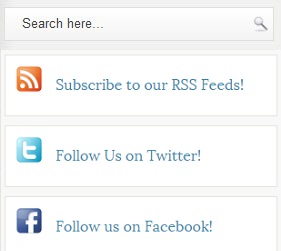
Social Media Widget With Search Box For Blogger

How To Add Social Widget With Search Box To Blogger
- Go To Blogger Dashboard.
- Layout >> Select HTML/JavaScript.
- Paste Below code.
<style type=”text/css”>
#search{width:268px; border:1px solid #E0DFD9;margin: 0 0 0 0;background:url(http://1.bp BLOGSPOT.com/-U9b2ClQr0qQ/T98EFU0pURI/AAAAAAAAA6M/dw8Dw4H_fR4/s1600/search-bgg.png) left top repeat-x;height:32px;padding:0;text-align:left;overflow:hidden} #search #s{width:80%; background:none;color:#3F3F3F;border:0;padding:4px;margin:3px 0 0 12px;float:left} #search .search-image{border:0;vertical-align:top;float:right;margin:8px 4px 0 2px} #search-wrap{padding:15px 0} .topsearch #search{margin-top:0;margin-bottom:10px}.social-connect-widget{background:#FFF;border:1px solid #E7E6DE;padding:10px}
</style> <div class=’topsearch’> <div class=’clerfix’ id=’search’> <form action=’/search’ id=’searchform’ method=’get’> <input id=’s’ name=’q’ onblur=’if (this.value == "") {this.value = "Search here…";}’ onfocus=’if (this.value == "Search here…") {this.value = ""}’ type=’text’ value=’Search here…’/> <input class=’search-image’ src=’http://3.bp BLOGSPOT.com/-OfKiE_4vvp8/T98EGUhcaDI/AAAAAAAAA6U/evh0_xmNLEs/s1600/searchico.png’ title=’Search’ type=’image’/> </form> </div> </div> <div style=’clear:both;’/> <div class=’social-connect-widget’ style=’margin-top:0px;margin-bottom:10px;’> <img alt=’RSS Feed’ src=’http://3.bp.blogspot.com/-eoQNuiS_DEE/T98CoPI65yI/AAAAAAAAA58/1C3-O73Gavs/s1600/social-rss-box-orange-icon.png’ title=’RSS Feed’/><div class=’Widget_text’ style=’margin-left:45px;margin-top:-30px;margin-bottom:10px;’> <a expr:href=’data BLOG.homepageUrl "feeds/posts/default"’>Subscribe to our RSS Feeds!</a> </div> </div> <div class=’social-connect-widget’ style=’margin-bottom:10px;’> <img alt=’Follow Us on Twitter!’ src=’http://4.bp.blogspot.com/-zcHeTCGPEzQ/T98Co2ASiiI/AAAAAAAAA6E/K9kv5Oag_Jo/s1600/social-twitter-box-blue-icon.png’ title=’Follow Us on Twitter!’/><div class=’Widget_text’ style=’margin-left:45px;margin-top:-30px;margin-bottom:10px;’> <a href=’http://twitter.com/mbg’> Follow Us on Twitter!</a> </div></div> <div class=’social-connect-widget’ style=’margin-bottom:10px;’> <img alt=’Be Our Fan!’ src=’http://4.bp.blogspot.com/-nQSUVBUO4w4/T98CnO1EjkI/AAAAAAAAA50/a3y-_20yP1s/s1600/social-facebook-box-blue-icon.png’ title=’Be Our Fan’/><div class=’Widget_text’ style=’margin-left:45px;margin-top:-30px;margin-bottom:-10px;’> <a href=’http://facebook.com/mbg’> Follow us on Facebook! </a></div><a href=’https://mybloggerguides.com/’><img src=’http://1.bp.blogspot.com/-MiryOkTk9fs/T9nKXxy3riI/AAAAAAAAA5o/kMhpj-0aCAM/s1600/image.png’ target=’_blank’/></a></div></div>
- Change Highlighted Colors into Yours.
- Now Click On Save.
- That’s it. You have added this widget successfully.
Conclusion:
Contents
