

Setup A Custom Stylish 404 Error Page In Blogger Blog

Check Live Demo Here.
See Also Another Stylish Widget
- Stylish Contact Form for Blogger! Add to Static Page.
- Stylish Popup Subscription Box for Blogger.
- WordPress Like Floating Social Sharing Counter Buttons for Blogger.
Steps To Setup Custom 404 Error Page in Blogger
Step 2] Now click anywhere inside template code box and press Cmd+f or Ctrl+f and search for code ]]></b:skin> and just below that code line, paste the CSS code given below after making required changes as shown below in Step 3]
<b:if cond=’data:blog.pageType == "error_page"’><style>#main-wrapper { width: 100%;} .sidebar-wrapper, .blog-pager { display: none !important;} #content-wrapper { width:99%!important;} .status-msg-wrap { font-size: 100%; margin: none; position: static; width: 100%; } .status-msg-border { display:none } .status-msg-body { padding: none; position: static; text-align: inherit; width: 100%; z-index: auto; } .status-msg-wrap a { padding: none; text-decoration: inherit; } #MBG-404-error-box{ background: #FFFFFF url(“http://2.bp.blogspot.com/-1FegLME1wQQ/Vio2N6YTxZI/AAAAAAAAECk/BwXtda6zTWo/s1600/MBG-Error-Page.png”) no-repeat scroll 0% 95% rgb(255, 255, 255); width: 97%; margin: 0px 0px; padding: 15px 20px 50px 20px; border: 1px solid #E7E7E7; -moz-border-radius: 6px; -webkit-border-radius: 6px; border-radius: 2px; height: 470px; }</style></b:if>
Step 3] Static: The CSS Code Highlighted in RED Color hides the sidebar and footer pages to make it static and display on the full page. If you want to keep sidebar along with that message, just remove that piece of code.
http://2.bp.blogspot.com/-1FegLME1wQQ/Vio2N6YTxZI/AAAAAAAAECk/BwXtda6zTWo/s1600/MBG-Error-Page.png
<div id=’MBG-404-error-box’><p align=”center”><font color=”#ff0000″ style=”font-size: 57px;”><strong>Oops!</strong></font></p></br><p><center><font color=”#000″>Seems like you either clicked a <div style=”color: #0089D6; font-size: 27px;”>Broken Link</div> <b>or a Page that no longer exist. Kindly do one of the followings:</b></font></center></p><div style=”line-height: 25px; font-weight:normal;”><center><b>✔</b> <a href=’javascript:history.go(-1)’>« Go Back</a>!</br><b>✔</b> Help us to Serve you better by <a href=’https://mybloggerguides.com/p/contact-us_12.html’>Reporting This Problem</a> to us!</br><b>✔</b> Go to <a href=’https://mybloggerguides.com’>Homepage Address</a>!<br/></center></div><p><br/></p><p align=”center”><font color=”#08C500″ style=”font-size: 100px;”><strong>404</strong></font></p><p align=’center’><font color=”#EB0F0F” style=”font-size: 20px;”>Page Not Found!</font></p> </div>
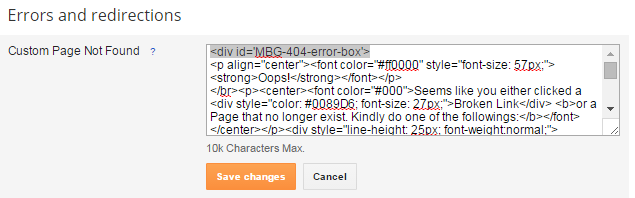
Step 5] In the above HTML code, just replace our Contact Us link and Homepage Address Link with your links. You can play with the Text also. Then hit save button and now visit your blog address with any link which does not exist and see the magic!!
Conclusion:
Contents
