
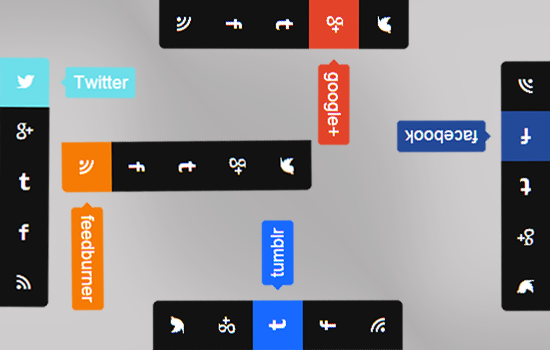
Stylish Slider Social Media Widget For Blogger
Today I’m publish a Professional Social Sidebar Widget for Blogger. It’s very attractive and beautiful social widget. This social connect widget position at sidebar and include slide out connect social options.

Many people think that Blogger lacks in all of the extra goodies you can add to other platforms like WordPress, but it simply isn’t true. By using widgets you can customize your blog as much as you like by just adding little snippets of code to the sidebars.
See Also Another Stylish Widget
- Stylish Contact Form for Blogger! Add to Static Page.
- Stylish Popup Subscription Box for Blogger.
- WordPress Like Floating Social Sharing Counter Buttons for Blogger.
Get Latest Blogger Widgets Here.
Why we want Pro Looking Widgets?
This widget is very effective and good looking. As a Blogger we always wants to look like professional and for looking like a pro blogger we must have to some pro looking widgets on our sidebar top bar and also in footer area. So for this need we are today here with a professional looking sidebar widget for blogger. Let’s see the demo and check out our tutorial and learn how to install this widget :
How To Add Professional Social Sidebar Widget To Blogger
- Go to Blogger Dashboard.
- Now Click On Layout >> Add A Gadget.
- Select HTML/JavaScript and Paste Below Code.
<style type=’text/css’>/*<![CDATA[*/ @charset “utf-8”;/* CSS Document *//* ———- ENTYPO ———- *//* ———- Digital Hub Inc : https://mybloggerguides.com/———- *//* ———- http://weloveiconfonts.com/ ———- */@import url(http://weloveiconfonts.com/api/?family=entypo); [class*=”entypo-“]:before { font-family: ‘entypo’, sans-serif;}/* ———- CSS ———- */#mbg-social-sidebar a { text-decoration: none; } #mbg-social-sidebar ul,#mbg-social-sidebar ul li,#mbg-social-sidebar ul li a { list-style: none; margin: 0; padding: 0;}/* ———- Social Sidebar ———- */#mbg-social-sidebar { right: 0;z-index:999; margin-top: -75px; /* (li * a:width) / -2 */ position: fixed; top: 50%;} #mbg-social-sidebar ul li:first-child a { border-radius: 0 5px 0 0; } #mbg-social-sidebar ul li:last-child a { border-radius: 0 0 5px 0; } #mbg-social-sidebar ul li a { background: #121212; color: #fff; display: block; height: 50px;font-size: 18px; line-height: 50px; position: relative; text-align: center; width: 50px;} #mbg-social-sidebar ul li a:hover span { right: 130%; opacity: 1;} #mbg-social-sidebar ul li a span { border-radius: 3px; line-height: 24px; right: -100%; margin-top: -16px; -ms-filter:”progid:DXImageTransform.Microsoft.Alpha(Opacity=0)”; filter: alpha(opacity=0); opacity: 0; padding: 4px 8px; position: absolute; -webkit-transition: opacity .3s, left .4s; -moz-transition: opacity .3s, left .4s; -ms-transition: opacity .3s, left .4s; -o-transition: opacity .3s, left .4s; transition: opacity .3s, left .4s; top: 50%; z-index: -1;}#mbg-social-sidebar ul li a span:before { content: “”; display: block; height: 8px; left: -4px; margin-top: -4px; position: absolute; top: 50%; -webkit-transform: rotate(45deg); -moz-transform: rotate(45deg); -ms-transform: rotate(45deg); -o-transform: rotate(45deg); transform: rotate(45deg); width: 8px; z-index: -2; } #mbg-social-sidebar ul li a[class*=”twitter”]:hover, #mbg-social-sidebar ul li a[class*=”twitter”] span, #mbg-social-sidebar ul li a[class*=”twitter”] span:before { background: #6CDFEA; } #mbg-social-sidebar ul li a[class*=”gplus”]:hover, #mbg-social-sidebar ul li a[class*=”gplus”] span, #mbg-social-sidebar ul li a[class*=”gplus”] span:before { background: #E34429; } #mbg-social-sidebar ul li a[class*=”tumblr”]:hover, #mbg-social-sidebar ul li a[class*=”tumblr”] span, #mbg-social-sidebar ul li a[class*=”tumblr”] span:before { background: #1769ff; } #mbg-social-sidebar ul li a[class*=”facebook”]:hover, #mbg-social-sidebar ul li a[class*=”facebook”] span, #mbg-social-sidebar ul li a[class*=”facebook”] span:before { background: #234999; } #mbg-social-sidebar ul li a[class*=”rss”]:hover, #mbg-social-sidebar ul li a[class*=”rss”] span, #mbg-social-sidebar ul li a[class*=”rss”] span:before { background: #f57b05; } /*]]>*/ </style> <div id=’mbg-social-sidebar’><ul><li><a class=’entypo-twitter’ href=’https://twitter.com/mybloggerguides’ target=’_blank’><span>Twitter</span></a></li><li><a class=’entypo-gplus’ href=’http://plus.google.com.com/mybloggerguides’ target=’_blank’><span>google+</span></a></li><li><a class=’entypo-tumblr’ href=’http://www.tumblr.com/mybloggerguides’ target=’_blank’><span>tumblr</span></a></li><li><a class=’entypo-facebook’ href=’http://www.facebook.com/mybloggerguides’ target=’_blank’><span>facebook</span></a></li><li><a class=’entypo-rss’ href=’http://feeds.feedburner.com/mybloggerguides’ target=’_blank’><span>feedburner</span></a></li><a href=’https://mybloggerguides.com’ rel=’dofollow’></a></ul></div>
Possible Editing.
- Make Changes Links in Yellow Highlighted Colors.
- Now Save HTML/JavaScript.]
- That’s it. You Have Added this widget successfully.
Conclusion:
Contents
