
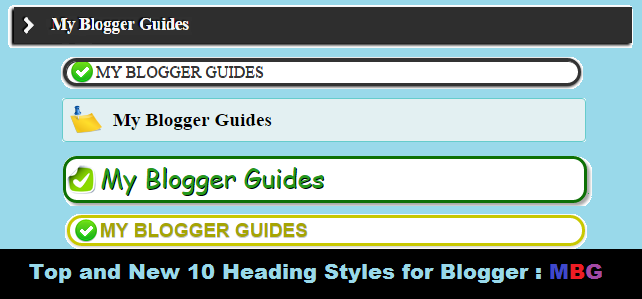
How to Change/Customize Heading Style in Blogger
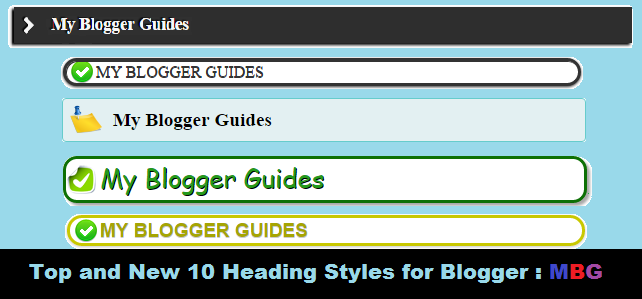
How To Customize Heading Style in Blogger?
1- Go To Blogger > Layout > Edit HTML
2- Search For ]]></b:skin> (Tip:- Press Ctrl + F )
3- Just above ]]></b:skin> paste one of the codes below,
Blogger Heading Style 1

.post h3 { padding: 3px; text-shadow: -2px -1px 1px #060606; box-shadow: -3px 2px 3px #000; padding-left: 10px; margin-bottom: 7px; background: #303030; color: #F7F7F7;}.post h3:before { font-family: FontAwesome; position: relative; content: ‘f054’; font-size: 17px; padding-right: 10px;}
Blogger Heading Style 2

.post h3 {
background-attachment: scroll;
background-color: white;
background-image: url(“http://2.bp.blogspot.com/-GZCR82-F-bU/UTnAhdjJ9eI/AAAAAAAAbXI/Fy0CjGpYCMM/s1600/h2.png”);
background-position: 4px 50%;
background-repeat: no-repeat no-repeat;
border: 3px solid;
border-radius: 60px 60px 60px 60px;
box-shadow: 0 1px 3px, 1px 1px 0 inset;
color: #333333;
font-family: inherit;
font-size: inherit;
font-size-adjust: inherit;
font-stretch: inherit;
font-style: inherit;
font-variant: inherit;
font-weight: inherit;
line-height: 1;
list-style: none outside none;
margin: 15px 3px;
outline: medium none;
padding: 3px 10px 3px 30px;
text-shadow: 0 1px 0;
text-transform: uppercase;
vertical-align: baseline;
}
Blogger Heading Style 3

.post h3 {
background-attachment: scroll;
background-color: white;
background-image: url(“http://4.bp.blogspot.com/-tFJEmtdTP9s/UTnAR0IbXxI/AAAAAAAAbXA/WO-NEvmKtXA/s1600/h2.png”);
background-position: 0 50%;
background-repeat: no-repeat no-repeat;
border: 3px solid #0D7005;
border-radius: 14px 14px 14px 14px;
box-shadow: 3px 3px 3px #ABABAB;
color: #25991C;
font-family: Lobster,cursive;
font-size: 26px;
font-weight: normal;
margin: 0 0 1em;
padding: 0 1px 4px 34px;
position: relative;
text-shadow: 1px 1px 0 #000000;
text-transform: capitalize;
}
Blogger Heading Style 4

.post h3{
background: url(“http://1.bp.blogspot.com/-zs4aWzVV5J4/UTm__Ri99eI/AAAAAAAAbW4/a–rNrWDM9Q/s1600/h2.png”) no-repeat scroll 4px center transparent;
border: 3px solid #C8C800;
border-radius: 60px 60px 60px 60px;
box-shadow: 0 1px 3px #C6C6C6, 1px 1px 0 rgba(255, 255, 255, 0.4) inset;
color: #A5A503;
font-family: ‘lobster’,sans-serif;
font-size: 19px;
font-weight: bold;
line-height: 1;
margin: 15px 3px;
padding: 3px 10px 3px 30px;
text-shadow: 0 1px 0 #CCCCCC;
text-transform: uppercase;
}
Blogger Heading Style 5

.post h3 {
background: url(“http://1.bp.blogspot.com/-wo4kiWscFy4/UTm_U5Uz8FI/AAAAAAAAbWo/vWgBX1TCQO0/s1600/star.png”) no-repeat scroll 5px center transparent;
clear: both;
color: #662D2D;
font-family: ‘Oswald’,sans-serif;
font-size: 26px;
font-weight: bold;
line-height: 1.2;
margin: 25px 5px;
padding: 6px 10px 2px 40px;
text-shadow: 0 1px 0 #CCCCCC;
text-transform: uppercase;
}
Blogger Heading Style 6

.post h3 {font-size:120%; font-weight:bold;
padding-bottom: 5px; margin: 10px 0;
background: #E3F0F2 url(http://2.bp.blogspot.com/-rYrj9bjhWEU/VDGo7uyJlkI/AAAAAAAAACY/ZxjX8wlLhFI/s1600/note.png) center no-repeat;
border: 1px solid #6CC;
background-position: 7px 50%;
padding: 10px 10px 10px 50px;
-moz-border-radius: 4px;
-webkit-border-radius: 4px;
}
Blogger Heading Style 7

.post h3 {
border: 1px dashed #C7C7C7;
padding: 3px;
box-shadow: 2px 2px 5px;
padding-left: 10px;
margin-bottom: 7px;
border-radius: 10px;
border-bottom-color: #000;
background: rgba(218, 218, 218, 0.04);
border-bottom-right-radius: 100px;
}
Blogger Heading Style 8

.post h3 {
background: transparent url(“http://2.bp.blogspot.com/-jNxuEWNpGTk/UV7-6ovsE3I/AAAAAAAABYs/tXcNlEqxCwM/s1600/h2.jpg”) repeat-x scroll 0px 0px;
color: #FFF;
font-size: 20px;
font-weight: 200;
letter-spacing: 0px;
font-family: fantasy;
margin-top: 20px;
margin-bottom: 20px;
box-shadow: 0px 1px 6px 3px #000;
padding: 10px 2px 10px 10px;
text-shadow: 0px 1px #000;
text-transform: uppercase;
}
Blogger Heading Style 9
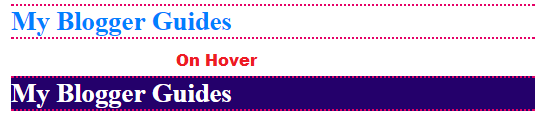
.post h3{
color:#0080ff;
border-top:2px dotted #E60066;
border-bottom:2px dotted #E60066;
font-size: 20pt;
}
.post h4:hover{
border-top:2px dotted #E60066;
border-bottom:2px dotted #E60066;
background-color: #24006B;
color:#fff;
}
Blogger Heading Style 10

.post h3{
color:#47006B;
border:1px solid #FF0000;
font-size: 20pt;
padding:2px;
}
4- Hit on Save Template. That’s it, You are done.
Our Recommended Blogger Widgets
- WordPress Like Floating Social Sharing Widget for Blogger with Counter.
- AllInOne Admin Box Widget with Social buttons and Subscription Box.
- Add Sticky Notification Bar To Blogger with Show/Hide Button.
- Stylish Contact Form For Blogger! Add to Static Page, Responsive & Pro Version.
- Cute & Stylish Email Popup Subscription Widget.
Conclusion:
Contents
