

How To Host Self CSS – JavaScript (.js) Files Using Dropbox

As we have mentioned above dropbox is the best cloud server. Dropbox gives us 2GB free space with 10GB/day Bandwidth(Data Transfer Limit) and if you are a paid user then you can get even more. By using dropbox we can direct hotlink to our files by public sharing.
Read Also : Floating – Horizontal Jumbo Animated Counter Social Share Bars for Blogger.
Okay now we are going to learn how to use dropbox for hosting our CSS file and JS Files without any cost. So lets get straight to work.
Host CSS & JS Files On Dropbox
STEP1] First you have to create a file which you want to host using notepad. To host a file, Open notepad and paste CSS code or script code which you want to host.
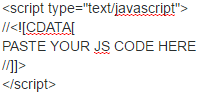
Note: Remove <style> … </style> tag from CSS files and <script> … </script> tags from JavaScript files.
STEP2] Now in the notepad menu click on File >> Save As and after that type the file name. For example : If you are creating a CSS Style sheet then type filename.css and if you are creating any script file then type filename.js. For more see demo screenshot below.

STEP3] In the same window (Save As) you have to select UTF-8 in Encoding option before save it. All all of above guide click on save button to save it.

STEP4] Now go to dropbox site and create an account on dropbox if you don’t have and after that verify your mail address.
STEP5] Now login to your dropbox account.
STEP6] Click upload button which is placed at the right side of page.

STEP7] Now click on choose file button which is appear on inline pop-up window.

STEP8] Select the file which you have created using notepad.

STEP9] After complete the process of uploading file click on Done.

STEP10] Click On Share Button >> Click on create a link to generate a link and after that click on copy link to copy the link.

STEP11] If link not copied then press CTRL+C to copy the file link.

How To Use Dropbox File Link to Host in Blogger?
Every dropbox link contain with ?dl=0 at last. This link format is for only see the file. So you have to change the link format. You can host dropbox file by doing little change. You have to replace ?dl=0 to ?dl=1 in every link which you want to host.
For example in our case the link which we have copied is https://www.dropbox.com/s/mooxqy1cdh37awg/filename.css?dl=0 but we have to change it like this https://www.dropbox.com/s/mooxqy1cdh37awg/filename.css?dl=1.
Hosting CSS Files in Blogger Using Dropbox
If you want to host CSS file then search for <head> tag inside blogger template code area and after that paste below line to template code area in <head> … </head> section and after that change link to your dropbox file link.
<link rel=”stylesheet” type=”text/css” href=”https://www.dropbox.com/s/mooxqy1cdh37awg/filename.css?dl=1“/>
Hosting JS Files in Blogger Using Dropbox
If you want to host JS file then search for </body> tag inside
blogger template code area and after that paste below line just above of </body> tag and after that change link to your dropbox file link.
<script src=”https://www.dropbox.com/s/mooxqy1cdh37awg/filename.js?dl=1” type=”text/javascript”></script>
After all above procedure click on save template button to save it properly.
Also Read : Customized Contact Form for Blogger Static Page.
Conclusion:
So above guide is about “hosting CSS and JS files using Dropbox”. We tried our best to make tutorial easy as much as possible but if any case you are facing problem then let us know via dropping a comment below. We would like to assist you. Hope you like this trick and now its your turn to give feedback via using comment box. Do Share with your friends and Subscribe Us.
Thank You! Stay Blessed!
Contents


Hello, can you please help me… I formerly embed a navbar with a google drive host link into my blog. Now these links don´t seem to work anymore and I´ve read that GD diasbles this function. So I need an alternative. Did everything as you explained but it doesn´t work…
This is my link: https://www.dropbox.com/s/rs5ug2dy1na41t9/MyMenu1?dl=1
And this the total Javascript-Code I´m trying to insert into a blogger widget:
Can you help me to fix it so that it works again? Would be so thankful!!!