
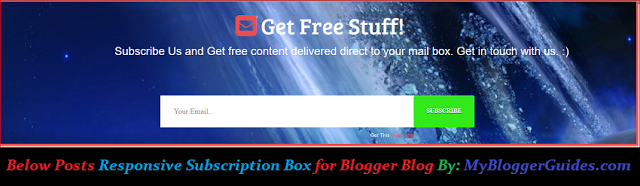
How To Add Responsive Subscription Box to Below Post
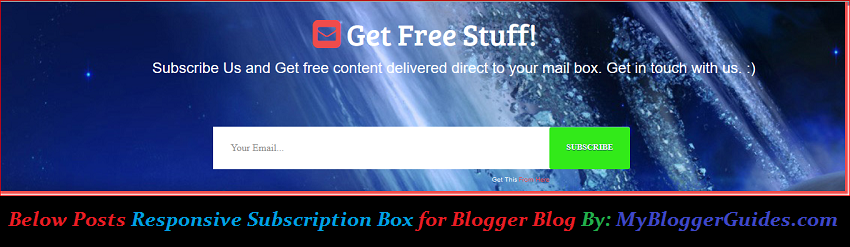
Live Demo
Actually we are here with another widget for blogger blogs after 2 months. In previous two months we have shared a lot of Blogger tricks with all of you. Hope you liked all article. Actually, Subscription box widget is must having widget on blog for every blogger because it can increase your subscribers on feedburner and we know all very well if we have subscribers of our feed on feedburner then it can increase page views of our blog easily, which can increase PR and alexa rank of our blog. so we suggest you, if you don’t have a subscription box widget in below post on your blog then must implement our widget. below are some features of this widget. Read before adding it on your blog.
Features of Subscription Box Widget
- It is fully responsive.
- Fast loading.
- Nice hover effect on Submit Button.
- Fully customized with CSS & HTML language.
- No need to say but it is also good looking. 🙂
- Go to Blogger Template >> Edit HTML.
- Click anywhere inside code area.
- Search for ]]></b:skin> tag by pressing CTRL+F.
- Paste following code just above of this tag.
.img img {
width: 100%;
}
div#subscribe-MBG {
background: url(https://3.bp.blogspot.com/-Tjya3y0t3SI/V0Qd2UG3vbI/AAAAAAAAEoc/-KFiv9l1ehIQIHuGuUF8kSK-HEMOPWsVgCLcB/s1600/48844_3d_space_scene.jpg) fixed;
margin-top: -54px;
color: #FFF;
box-shadow: 2px 2px 2px 2px #EF4C4C;
border-top: 2px solid EF4C4C;
height: 100%;
font-family: sans-serif;
}
#HTML100 h6.title {
font-size: 40px;
}
#HTML100 i.fa.fa-envelope-square {
color: #EF4C4C;
font-size: 43px;
margin-left: 37%;
margin-top: 60px;
}
#HTML100 .widget-content1 {
margin-left: 18%;
font-size: 20px;
}
#HTML100 .widget-content2 {
margin-left: 32%;
}
form#mbg-embedded-subscribe-form {
margin-left: -10%;
margin-top: 7%;
margin-bottom: 20%;
}
input.mbg-newsletter-submit:hover {
background: #132df2;
border-bottom: 2px solid #132df2;
}
input.mbg-newsletter-address {
padding: 20px;
font-family: Oswald;
width: 50%;
border: 0px;
float: left;
}
input.mbg-newsletter-submit {
float: right;
background: #32ea19;
transition: .2s;
border: 0;
margin-right: 34%;
font-family: Oswald;
color: #FFF;
border-bottom: 2px solid #32ea19;
top: -67px;
position: relative;
padding: 20px;
cursor: pointer;
}
#mbg_box_by { font-size: 8px; text-align: right;}
#mbg_box_by a{color: #EF4C4C;}
@media screen and (max-width: 960px){
#HTML100 i.fa.fa-envelope-square { margin-left:33%}
#HTML100 .widget-content1 {
margin-left: 1%; margin-right: 1%;
} #HTML100 h6.title {
font-size: 40px;
}
}
@media screen and (max-width: 768px){
#HTML100 i.fa.fa-envelope-square { margin-left:24%}
#HTML100 .widget-content1 {
margin-left: 18%; margin-right: 18%;
} #HTML100 h6.title {
font-size: 40px;
}
}
@media screen and (max-width: 500px){#HTML100 i.fa.fa-envelope-square { margin-left:18%}
#HTML100 .widget-content1 {
margin-left: 14%; margin-right: 14%;
} #HTML100 h6.title {
font-size: 36px;
}
}
@media screen and (max-width: 420px){
#HTML100 i.fa.fa-envelope-square { margin-left:16%}
#HTML100 .widget-content1 {
margin-left: 12%; margin-right: 12%;
} #HTML100 h6.title {
font-size: 32px;
}
}
@media screen and (max-width: 320px){
{#HTML100 i.fa.fa-envelope-square { margin-left:14%}
#HTML100 .widget-content1 {
margin-left: 8%; margin-right: 8%;
}
}
Customization:
- If you want change background image then change above orange link.
- Now search for <data:post.body/> tag and paste below code just below of this tag.
Note: If you are using read more button on your blog then you can find this tag 2 to 3 times. So paste below code which suite on your blog. Generally second one is right selection.
<b:if cond=’data:blog.pageType == "item"’> <div class=”section” id=”subscribe-MBG”><div class=”widget HTML” id=”HTML100″>
<h6 class=”title”><i class=”fa fa-envelope-square”></i>Get Free Stuff!</h6><div class=”widget-content1″>Subscribe Us and Get free content delivered direct to your mail box. Get in touch with us. :)</div><div class=”widget-content2″><form action=”http://feedburner.google.com/fb/a/mailverify” method=”post” target=”popupwindow” onsubmit=”window.open (‘http://feedburner.google.com/fb/a/mailverify?uri=MyBloggerGuides’, ‘popupwindow’, ‘scrollbars=yes,width=550,height=520’);return true” id=”mbg-embedded-subscribe-form” name=”mbg-embedded-subscribe-form” class=”validate” novalidate=””><div><input value=”” name=”EMAIL” class=”mbg-newsletter-address” placeholder=” Your Email…” required=”” type=”email”><!– real people should not fill this in and expect good things – do not remove this or risk form bot signups–><br><div style=”position: absolute; left: -5000px;”><input tabindex=”-1″ value=”” type=”text”></div><div class=”clear”><input value=”Subscribe” name=”subscribe” class=”mbg-newsletter-submit ripple-effect” type=”submit”></div></div><div id=”mbg_box_by”>Get This <a href=”https://mybloggerguides.com”>From Here</a></div></form></div></div></div></b:if>
Customization:
- If you want change message then change Yellow highlighted color.
- Change MyBloggerGuides with your Feedburner id.
- When you finish customization then hit on save template.
- That’s it. You are done.
- Now go to your blog and enjoy this widget.
Our Recommended Blogger Widgets
- WordPress Like Floating Social Sharing Widget for Blogger with Counter.
- AllInOne Admin Box Widget with Social buttons and Subscription Box.
- Add Sticky Notification Bar To Blogger with Show/Hide Button.
- Stylish Contact Form For Blogger! Add to Static Page, Responsive & Pro Version.
- Cute & Stylish Email Popup Subscription Widget.
Conclusion:
So above guide is about How To Add Responsive Subscription Box to Below Post on Blogger? We hope you liked it. We think this is enough guide for adding this widget on your blog. If anyhow problem occurs then ask us via dropping a comment below. If you liked it then give your feedbacks also. Do share and subscribe us.
Contents
