
How To Activate Feedburner Recent Posts Widget
Are you trying to add Feedburner Recent Posts Widget For Your Blogger Blog. So today I’m here with complete guide for How To Activate Feedburner Recent Posts Widget For Your Blogger Blog. We have already share a lot of Blogger widget and Blogger Guides for all of you and this is another recommended widget for bloggers. By using this widget in Blog we can increase page views and also tell to readers about recently published posts on our Blog.
 |
| Recent Posts Widget by FeedBurner |
How To Activate FeedBurner Recent Posts Widget
Recent post widget is more useful to blogger Actually, blogger also provided recent post widget, But sometime it take few more seconds to load. So, you can add recent post widget from Feedburner. This is cool widget and easy to install. If you want to add this widget in your blogger blog then You can follow these steps.
Steps For Activating Feedburner Recent Post Widget
- Go to Feedburner
- Now click Publicize like below image.

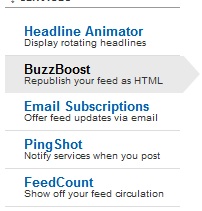
- Now Click On BuzzBoost which you can find on sidebar.
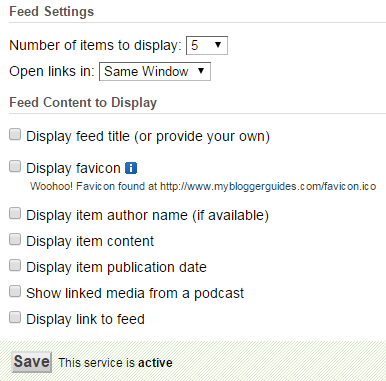
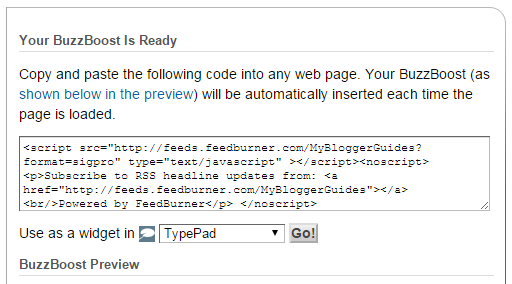
- Now you find feed setting like below image. Setup it as you want.
- Now Click Activate Button. If you have already activate then save it.
- Now Use As A Widget and click on go.
- You can add it as a Blogger widget.
- That’s it. you have activated recent posts in feedburner.

Our Recommended Blogger Widgets
- WordPress Like Floating Social Sharing Widget for Blogger with Counter.
- AllInOne Admin Box Widget with Social buttons and Subscription Box.
- Add Sticky Notification Bar To Blogger with Show/Hide Button.
- Stylish Contact Form For Blogger! Add to Static Page, Responsive & Pro Version.
- Cute & Stylish Email Popup Subscription Widget.
Conclusion:
So above guide is about How To Activate Feedburner Recent Posts Widget for Blogger Blog. Hope by using this post you can increase page views of your blogger blog. If you have any query related to this topic then drop a comment below. Hope you will like this post. Don’t forget to share on Blogging Communities and with your Blogger Friends.
Thank You! Stay Blessed!
Thank You! Stay Blessed!
Contents
