

How To Create a Custom Landing Page in Blogger
Why Do You Need Of A Landing Page?

If you are in the field of blogging then you will surely know about the importance of landing pages for your blogs. We see many Blog site that use Welcome page or Landing Page. For creating a better impression about Blog Landing page is necessary. When it comes to branding and affiliate marketing then custom landing pages are also very useful. They Help you to increase your subscribers, promote your products and services and increase your affiliate sales. There are major benefit of landing page is for swift load. Suppose your blog is completely full with graphics or added many graphics then you may use landing page for faster load. Your blog readers will love it. There are many types of landing pages which we want on our blog. List is given below:-
Types Of Landing Pages:-
Welcome Landing Page
Thank You! Landing Page
Coming Soon Landing Page
Start Here Landing Page
Other Landing Pages
You can create your landing pages according to your purpose. Like as for the visitors landing on your blog from your social network profile links, you can create a special landing page welcoming the visitor, telling about yourself and what you have to offer with a strong call to action button.
Are You Ready To Design Your First Landing Page On Blogger?
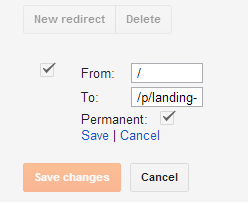
Tips on How You Can Customize Your Landing Page Using Post Editor:-
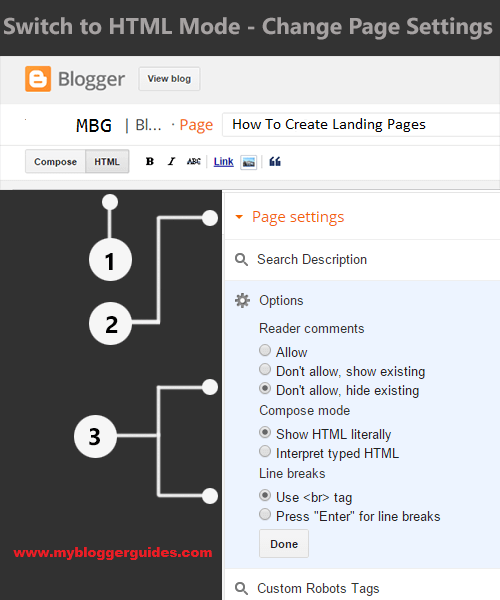
First we should add CSS Coding by which we can hide our Sidebar, Header, Footer. I mean to say if you want to make your blog’s main section full width then copy below CSS code and paste it on post editor.
<style>
#sidebar-wrapper, #midsidebar-wrapper, .gapad2, .blog-pager, .post-header-line-1, .post-footer { display:none !important;}#main-wrapper { width:98%!important;}
.post { width:98%!important; }
</style>
This code works well for original blogger template, But you can also try it on Custom Made/Magazine style blogger templates.
Now to use the CSS then just put your CSS code using the </style> tag. For example:-
<style>
#my-landing-page-header {
width: 100%;
background: #000;
font-size: 20px;
padding: 20px 0px;
color: #FFF
}
</style>
Now you can call the above CSS style in HTML to apply it. For example:-
<div id=”my-landing-page-header”> Hello World! This is my First Landing </div>
Result is this:-
Wondering if we could use the CSS code we have added to our template code using a conditional tag inside the post editor itself?
So this is how you can design your own custom landing pages on blogspot. All those bloggers who are familiar with the CSS and HTML will find this tutorial super easy and those who are new to it, please feel free to poke me anytime. I’ll personally visit your blog and help you out to make things super easy for you. 🙂
Right now there is no one click solution for creating your landing page but in future, I’ll design my own template and a Landing page will be the integral part of it. Then you’ll need not to inspect the elements and mess-up with the code.
Soon I’ll design my different landing page templates and share with you if you guys need (let me know in comments :p). You can use them with a simple copy & paste function inside the post editor. Then make a few changes here and there and voila, your landing page is ready so please don’t forget to subscribe. 🙂
Our Recommended Blogger Widgets
- WordPress Like Floating Social Sharing Widget for Blogger with Counter.
- AllInOne Admin Box Widget with Social buttons and Subscription Box.
- Add Sticky Notification Bar To Blogger with Show/Hide Button.
- Stylish Contact Form For Blogger! Add to Static Page, Responsive & Pro Version.
- Cute & Stylish Email Popup Subscription Widget.
Conclusion:
So above guide is about How To Add or Create A Landing Page in Blogger Blog? Hope this tutorial helps you in creating a landing page in Blogger. If you have any query related to the topic then drop a comment below. You can also shoot me an email using the contact form in my contact us page. Do share and subscribe us for get more updates direct in your mail box.
Contents
